Skip to content

Changelog, 34

Every release, in plain words.

34 releases since 5 July 2026, newest first. Each one lists what is new, what was improved and what was fixed, from the release notes inside the tool, edited for the web.

Latest release

v2.0.0 The new workspace

  • 11 new items
  • 1 fix
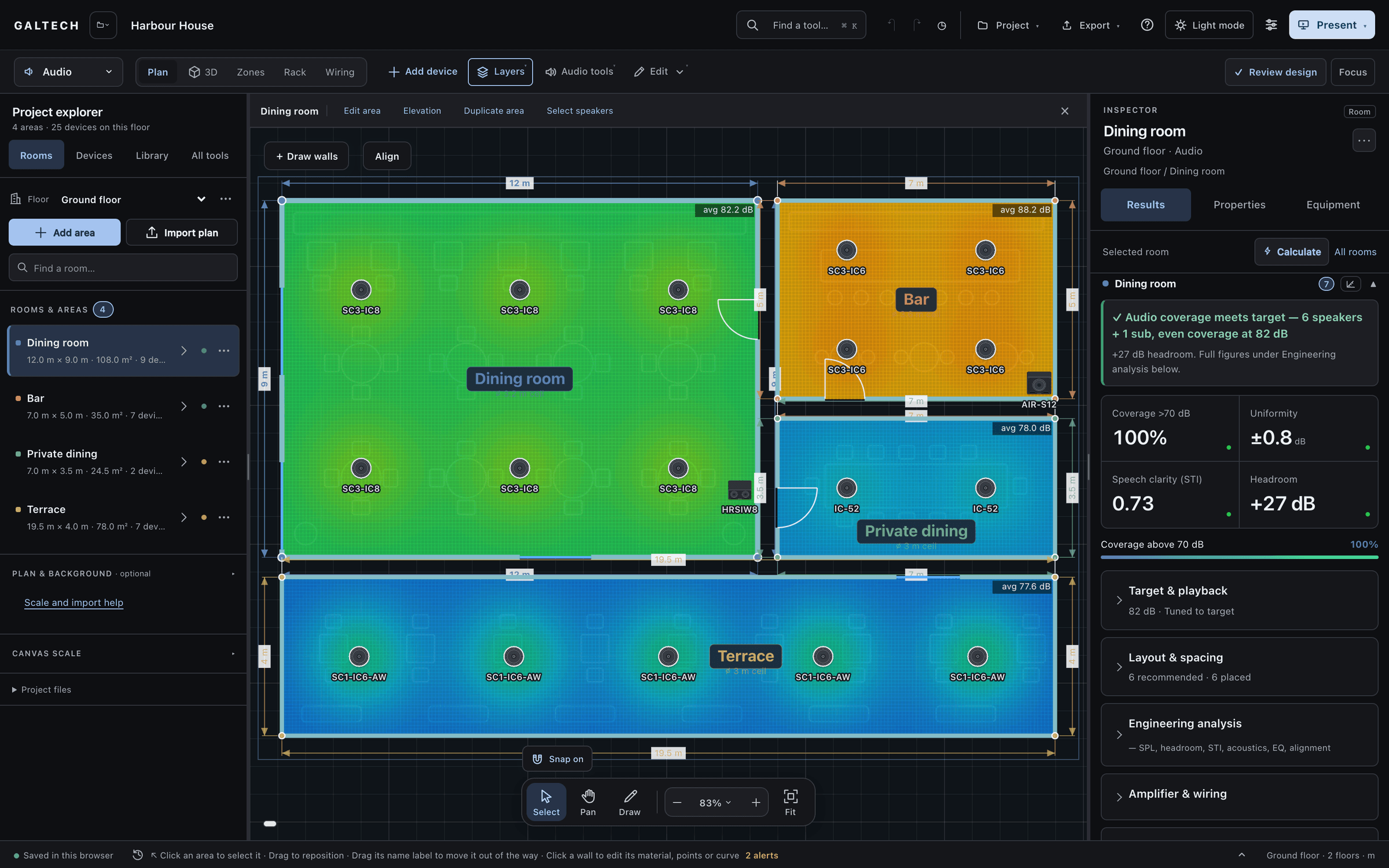
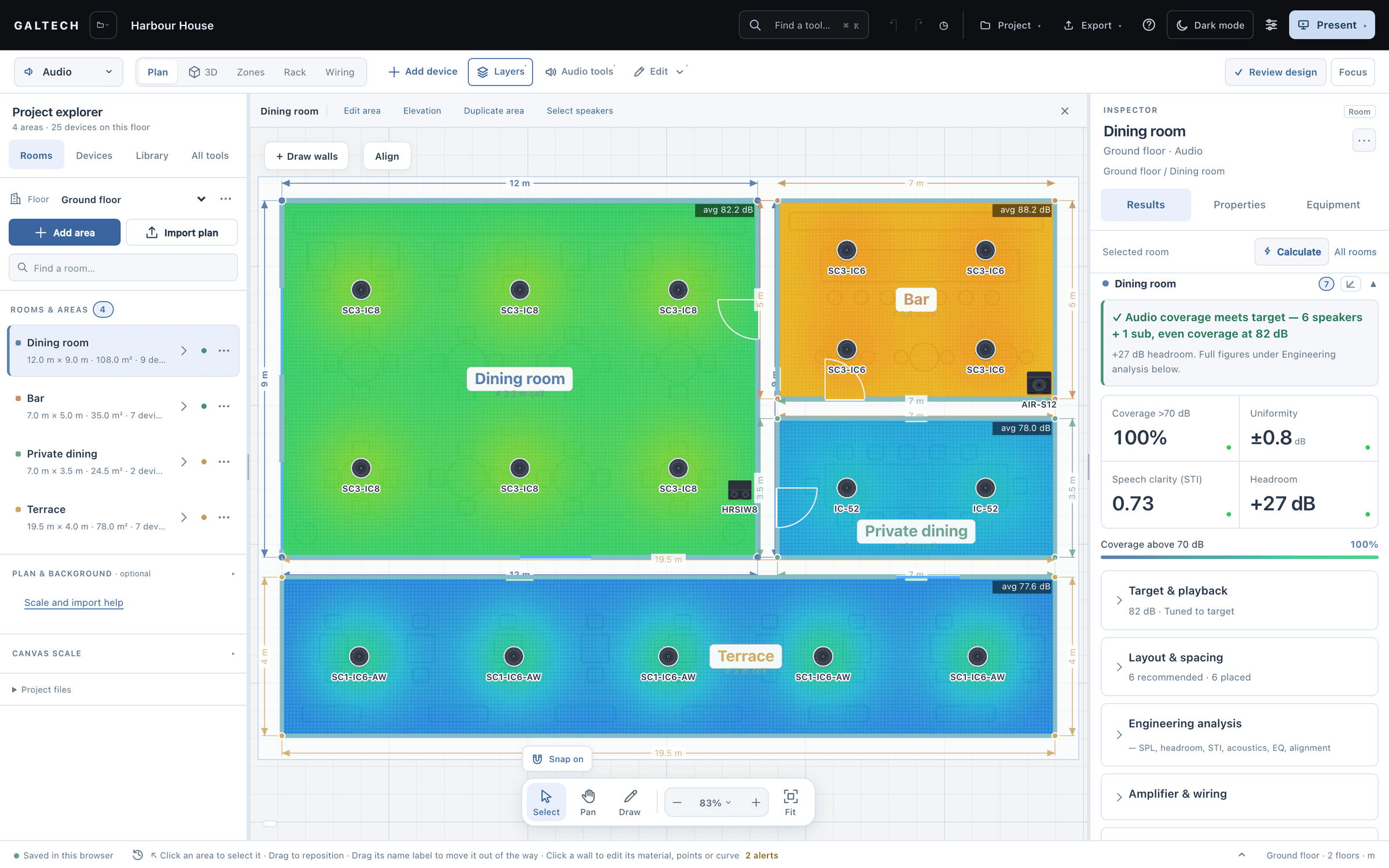
  • A redesigned workspace. A discipline selector and Plan, 3D, Zones, Rack and Wiring tabs run across the top.
  • A floating dock zooms and fits the canvas.
  • Wall editor: click a wall to set its length, add a point, bend it into an arc, or give it a material (glass, brick, wood, concrete or drywall).
The dark workspace on the Harbour House ground floor: four areas on an SPL heatmap over the near-black plan, the dining room green, the bar orange, private dining and the terrace blue, each speaker labelled by model. The Inspector shows the dining room at 100% coverage, ±0.8 dB uniformity, STI 0.73 and +27 dB headroom.
The design workspace on the Harbour House ground floor: four areas on an SPL heatmap, the dining room green, the bar orange, private dining and the terrace blue, with each speaker labelled by model. The Inspector shows the dining room at 100% coverage, ±0.8 dB uniformity, STI 0.73 and +27 dB headroom.

Since v2.0.0. 8 more changes went in on 19 October 2026, with no new version number, so they have no release note. The news posts explain them: Dark mode reaches the plan and the 3D view and Four narrated lessons in the Learning Centre.

shipping log, 630

Shipped, day by day.

630 changes to the tool on 58 days since 12 June 2026. A change is one commit to the tool's source, counted from the repository. Releases bundle them; a ring marks each release day.

Select a day

Each square is one day. Select one to see how many changes went in, and which releases shipped.

releases since July 2026
34
tool changes since 12 June 2026
630
days with changes shipped
58

releases, 34

All 34 releases, newest first.

New is a feature that was not there before. Improved is a change to one that was. Fixed is something that did not work as it should, and now does.

October 20261 release

Link to v2.0.0Latest

v2.0.0: The new workspace

  • 11 new items
  • 1 fix
  • New

    A redesigned workspace. A discipline selector and Plan, 3D, Zones, Rack and Wiring tabs run across the top. The Project explorer on the left holds floors, areas, devices and the library; the Inspector on the right shows Results, Properties and Equipment.

  • New

    A floating dock zooms and fits the canvas. Focus hides the side columns, and Present opens the client presentation and the walk-in.

  • New

    Wall editor: click a wall to set its length, add a point, bend it into an arc, or give it a material (glass, brick, wood, concrete or drywall). Materials show in 3D and feed the Wi-Fi and acoustic calculations.

  • New

    Set the plan scale from two points on an imported PDF, image or CAD plan.

  • New

    Speakers sit anywhere in an area or follow the nearest wall. Mounting and height are set separately, and the aim survives a trip to 3D. A side view shows where the beam meets listening height.

  • New

    Real 3D models of speakers, access points and cameras, on a light architectural model with wall thickness and materials.

  • New

    Wiring in three views: a System diagram with rack and room containers, a port-level Schematic with cable IDs and a cable schedule, and printable Room sheets. The wiring exports as an editable DXF with cable layers and a legend.

  • New

    Prepare reports opens a full-page report workspace: packages for client, installer or full handover, an introduction per venue type, and a live PDF preview with contents and bookmarks. Download is the only button that saves a file.

  • New

    Review design lists every open check across the project, with one-click fixes. Client handover prints plan, equipment and connection schedules. Site tracking records measured SPL, STI and RT60 per area through installation.

  • New

    The Learning Centre replaces the Help panel: a visual tour of four narrated, captioned lessons recorded from the tool, searchable task guides and troubleshooting, and a printable user manual per discipline.

  • New

    The Equipment tab lists what is installed in the selected area, or across the whole project including the rack. Either view exports as CSV.

  • Fixed

    Reopening a project could start a second copy of it in My projects. Saves are now compared as designs, so the project joins the record that already holds it.
Read the announcement: The new workspace

September 202620 releases

Link to v1.10.23

v1.10.23: Area numbers are reused

  • 1 fix
  • Fixed

    Delete Area 1 and draw a new one, and it used to become Area 2. A new area now takes the lowest free number, and gaps in the middle are filled first.

Link to v1.10.22

v1.10.22: Subwoofers count where they play

  • 1 new item
  • 1 fix
  • Fixed

    A subwoofer used to lift an area’s SPL average, headroom and verdict by several dB, because the heatmap summed it as a full-range speaker. Broadband figures now come from the mains alone, so an area with a sub reads a few dB lower. That is the correction.

  • New

    Subwoofers are judged in their own range: the 63 and 125 Hz bands, a low-frequency extension row, and a new check of subwoofer level against the mains.

Read the announcement: Subwoofers now count where they play
Link to v1.10.20

v1.10.20: Product photos in the report’s System Diagram

  • 1 fix
  • Fixed

    The System Diagram in the report used drawn speaker art. Its PDF and PNG now carry the same product photos as the screen.

Link to v1.10.19

v1.10.19: Nothing is lost on a refresh

  • 1 fix
  • Fixed

    A refresh could lose the last thing you did, such as a level trim. The last changes are now written the moment you leave and read back when the tool reopens, and every per-speaker tuning control is saved like any other change.

Link to v1.10.18

v1.10.18: The report’s 3D view shows the area, large

  • 1 fix
  • Fixed

    The report’s 3D area view showed the whole floor, small. It now shows only the area the page documents, filling the picture, and a long terrace is viewed across its long side.

Link to v1.10.17

v1.10.17: One dimension label, a DML’s true window, and the report’s 3D is the System 3D

  • 3 fixes
  • Fixed

    Every area reads the same way in the report, the room cards, the proposal and the plan: its extent and its floor area, as in 35.4 m × 2.7 m · 95.6 m².

  • Fixed

    A DML flat panel keeps its 165° × 165° window and its 3 dB per doubling of distance in the ceiling, as on the wall.

  • Fixed

    The report’s 3D area view is now the System 3D itself, framed on the area: walls, open sky, speakers, coverage and SPL chips as the screen shows them.

Link to v1.10.16

v1.10.16: A zone can span amplifiers

  • 1 new item
  • New

    A zone with more speakers than its amplifier has channels now spans a second unit. Channel counts, the amp plan, the cable schedule and the wiring diagram follow the split, and Auto-assign splits a zone when no single unit has the channels.

Link to v1.10.15

v1.10.15: The 3D view no longer moves what you placed

  • 1 fix
  • Fixed

    Speakers could move after a visit to the 3D view. A click in 3D now only selects, corners and chips respond only while the edit handles show, and a dragged speaker moves exactly as far as you drag it.

Link to v1.10.14

v1.10.14: Headroom that reads the amplifier, and cameras in the proposal

  • 1 new item
  • 1 fix
  • Fixed

    Peak power handling follows one rule: the datasheet’s peak figure wins, an AES rating gives 4 × AES, and anything else gives 4 × the rating. The allowance counts only as far as the assigned amplifier can deliver it, and the verdict reads the continuous level first.

  • New

    Cameras and the recorder are priced lines: a CCTV group in the proposal, Camera and NVR rows in the BOM CSV, and a CCTV category in the quote lines.

Link to v1.10.13

v1.10.13: A project is its own

  • 2 new items
  • 2 fixes
  • Fixed

    A new project could carry the previous one’s video, control, rack and CCTV settings. Every way of replacing a project now starts from a clean slate.

  • Fixed

    A template started over an open project no longer saves itself into that project.

  • New

    Clear rack empties the cabinet and resets its size. Clear diagram empties the wiring sheet, and Undo brings it back.

  • New

    Video distribution and Control and automation gain Clear all. A video design drawn for areas that were since renamed or deleted says it is out of date.

Link to v1.10.12

v1.10.12: The Wi-Fi ray has a height

  • 1 fix
  • Fixed

    Wi-Fi coverage measured distance along the floor, so right under a ceiling access point it reported −33 dBm, which no meter could read. The model now uses the real slant from the ceiling to the device: the peak under an access point reads about −51 dBm, and coverage percentages are unchanged.

Link to v1.10.11

v1.10.11: A wall is one wall

  • 1 fix
  • Fixed

    A wall shared by two areas cost the Wi-Fi signal twice: a 15 dB concrete wall cost 30. Each wall now costs what its label says, once. Coverage through heavy interior walls improves, and auto-place may need fewer access points.

Link to v1.10.10

v1.10.10: The numbers behind the design, checked

  • 6 fixes
  • Fixed

    Quote lines carry the proposal’s currency, so a USD quote imports into Zoho Books or QuickBooks as USD.

  • Fixed

    Outdoor areas no longer get the reverberant field of a sealed room. An open sky adds none, and an open side shortens the estimated RT60.

  • Fixed

    Headroom is worked out one way everywhere: the results panel, the standards table and the PDF share one figure. Signal to noise is worked out against the room’s ambient.

  • Fixed

    70 V and 100 V lines: auto-assign offers only amplifiers with a line output, keeps the 80% channel rule, and moves the line load, the heatmap and the DSP limiter together.

  • Fixed

    CCTV: a fisheye’s reach is corrected, DORI bands are drawn as floor distances, and the NVR is sized for every floor. The PoE audit reports port class and a budget in its last 10%.

  • Fixed

    Multi-floor exports: the cable pull schedule, the IP plan and the DSP preset cover every floor, and catalogue prices include every floor and the access points.

Link to v1.10.9

v1.10.9: Get started stays closed

  • 1 fix
  • Fixed

    The Get started panel could come back after you closed it and block clicks on the plan. It now stays closed.

Link to v1.10.8

v1.10.8: Put the screen back the way it was

  • 1 fix
  • Fixed

    The text size button only ever got bigger. It is now a menu of four sizes with the current one ticked, and 100%, marked Original, is one click away.

Link to v1.10.7

v1.10.7: Schedules that do not overlap, and spreadsheets that do not split

  • 3 fixes
  • Fixed

    A long area name in a schedule no longer runs through the row beneath it. Every schedule row is as tall as its contents.

  • Fixed

    An inch mark in a product name could push a CSV row into the wrong columns. All CSV exports now protect their contents.

  • Fixed

    The button that docks the rack or the wiring beside the plan sits at the right of the title bar, next to close.

Link to v1.10.6

v1.10.6: Send the quote straight into your own accounts system

  • 1 new item
  • New

    The proposal exports Quote lines, a CSV made for Zoho Books or QuickBooks: one table, a part code on every row, and only the lines left in the proposal. Import it as an estimate instead of retyping it.

Link to v1.10.5

v1.10.5: The rack and the wiring diagram open full page again

  • 2 fixes
  • Fixed

    The rack elevation and the single-line diagram open as a full page again, and the tool remembers whether you prefer them full page or docked beside the plan.

  • Fixed

    Closing the rack or the wiring diagram returns you to the plan.

Link to v1.10.4

v1.10.4: The rack and wiring tabs get their column back

  • 1 fix
  • Fixed

    The rack designer and the wiring diagram fit the space they are given, so the device list, the settings, Auto-fill and the legend are back in reach.

August 20265 releases

Link to v1.10.3

v1.10.3: The whole building in the paperwork, and a corrected speaker count

  • 5 new items
  • 7 fixes
  • Fixed

    The Coverage Advisor now knows how you mounted a speaker, so a ceiling-mounted flat panel is no longer planned as a run around the walls.

  • Fixed

    Every export covers the whole building: the proposal, its cover image, and the 2D and 3D CAD. The 2D CAD places the floors side by side, each one labelled.

  • Fixed

    The aim you set on a speaker survives a recalculation.

  • Fixed

    Speaker counts are reworked. Coverage now counts to the real −6 dB edge at the throw distance, counts are not padded to an even number, and the worst-case level is sampled across the actual room.

  • Fixed

    L-shaped and traced areas are measured by their real shape rather than the rectangle around them, so floor area, perimeter and volume are right.

  • Fixed

    Tuning an area to its target no longer reads as a loss of capability. The verdict says which of the two you are looking at.

  • Fixed

    The sound wave in 3D draws only for the area you are working on.

  • New

    Tuning is per area. A restaurant can be tuned to its target while a demo area runs at full output, in one project.

  • New

    Set the target level you want for each area, and the advisor sizes the system for it.

  • New

    Put your own image on the proposal cover. CAD exports carry a legend naming every symbol, and flat panel speakers are drawn as panels.

  • New

    A client 3D tour link can be given a lifetime and revoked. New links expire after 90 days.

  • New

    The 3D view is a model rather than an editor. The editing handles are hidden, so the screen can be turned to a client as it is.

Link to v1.8.7

v1.8.7: A correct speaker count, and a calmer screen

  • 2 new items
  • 3 fixes
  • Fixed

    The Coverage Advisor plans for the mount you used. A 12.7 × 6.2 m room with three ceiling panels is no longer told to add seven more.

  • New

    The rack, the zones and the wiring diagram are tabs above the plan: views of the same project, not separate windows.

  • New

    A text size control at 100%, 115%, 130% or 150%. It scales the whole interface and is remembered on your computer.

  • Fixed

    Sound-leak marks are small badges, coloured by how far the spill is above the neighbour’s ambient, and the Layers menu can hide them.

  • Fixed

    The area results lead with the verdict and keep it in view; the rest folds away. Several speakers of one model are one line.

Link to v1.8.5

v1.8.5: One list of projects, and no more copies of them

  • 3 improvements
  • 1 fix
  • Improved

    My projects shows what this computer saved and what your account holds in the cloud, in one list.

  • Improved

    A project you make is copied to your account in the background, so it is on every machine you sign in from.

  • Improved

    Opening a project from a file no longer overwrites the project that was open.

  • Fixed

    Reloading no longer leaves a second copy of the same project in the list.

Link to v1.8.4

v1.8.4: Reports tell you what happened

  • 1 fix
  • Fixed

    With no system ticked, generating a report now says so clearly. When a browser blocks the extra downloads of separate files, the tool says so and suggests the single combined PDF.

Link to v1.8.0

v1.8.0: Multi-floor, CCTV, Wi-Fi coverage and projects that save themselves

  • 9 new items
  • 4 fixes
  • New

    Multi-floor projects: as many floors as the building needs, each with its own plan, areas and devices. The rack, zones and wiring serve the whole building, and the 3D view can stack every floor at its real height.

  • New

    CCTV design: camera views clipped by the walls, a pixel-density map graded per EN 62676-4, NVR and storage sizing for the retention you need, a PoE budget and a camera schedule.

  • New

    Wi-Fi coverage: a live signal map per band (2.4, 5 or 6 GHz) with real wall losses per material. Auto-place hits a coverage target, and a ports check counts every connected device against the switches.

  • New

    Video distribution: a TV, LED screen or projector per area. Auto-design picks an HDBaseT matrix or AV-over-IP and adds the Netvio parts to the rack and the BOM.

  • New

    Projects save themselves. A moment after you stop working, the project is saved, and it reopens by itself next time.

  • New

    Replace model: swap one speaker, every one of that model in the area, or the whole design. Positions and aim are kept.

  • New

    Templates for a villa, a restaurant, a retail unit or an office. Import products from a CSV, and apply your own price list across the job.

  • New

    Automatic backups every few minutes and on every save. Restore any of the last 25 with one click.

  • New

    Import a DXF or DWG plan and trace it to scale. Export a branded report per system, or all of them in one PDF.

  • Fixed

    Reports that include the video system download again.

  • Fixed

    A traced rectangle lays out exactly like one typed in.

  • Fixed

    Names with characters such as <, >, & or quotes always display as plain text.

  • Fixed

    Zones on other floors keep their amplifier when areas are edited.

Read the announcement: Multi-floor projects, CCTV and Wi-Fi coverage

July 20268 releases

Link to v1.7.56

v1.7.56: People in the room, coverage spotlights and 3D camera views

  • 3 new items
  • New

    Place a standing or a seated person where the sound matters. Each listens at real ear height, 1.7 m or 1.2 m, and the design is evaluated there.

  • New

    Coverage spotlights: every speaker casts a beam coloured by its SPL, in the 3D view and the walk-in.

  • New

    Front, Rear, Side and Top buttons snap the 3D camera, and the nearest wall turns see-through as you orbit.

Link to v1.7.45

v1.7.45: See the sound

  • 1 new item
  • New

    Sound wave: coloured wavefronts travel out from every speaker, matched to the SPL heatmap, in the 3D view, the walk-in and Share 3D.

Link to v1.7.15

v1.7.15: Sound wave animation, DML flat-panel physics and smarter layouts

  • 4 new items
  • 2 fixes
  • New

    Sound wave in the 3D view: wavefronts leave every speaker and sweep the listening plane, 150 times slower than real sound, so the eye can follow.

  • New

    Drag any number to change it. Hold Shift for bigger steps, or click once and type.

  • New

    DML flat panels are modelled as distributed-mode radiators: about 3 dB lost per doubling of distance out to about 10 m, with 165° dispersion.

  • New

    A Commissioning and Tuning section in Help covers the treatment advisor, room modes and sub placement, time alignment, site calibration and the ray-traced check.

  • Fixed

    Speaker counts follow common practice, and speakers are never packed closer than 2 m. A 20 m² café now suggests 4 to 6 ceiling speakers, not 12.

  • Fixed

    Optimize spacing snaps rectangular rooms to an even grid.

Link to v1.6.0

v1.6.0: System reports, command palette and dark mode

  • 5 new items
  • New

    System reports: Audio, Video, Automation, Wiring and Rack, each as its own PDF or bundled into one. The Audio report carries per-area plans, the SPL heatmap, the acoustics and a QR code to each area’s 3D tour.

  • New

    The single-line diagram reflows for portrait or landscape, and its PDF fits the whole system on one page or adds detail sheets.

  • New

    A Gym and fitness venue preset, with a 98 dB target, a 1.2 s RT60 and a 78 dBA noise floor.

  • New

    Command palette: Ctrl or Cmd and K jumps to any tool, menu, library or export by name.

  • New

    Dark mode for the whole interface. Designs, heatmaps and reports are unchanged.

Read the announcement: Dark mode reaches the plan and the 3D view
Link to v1.5.0

v1.5.0: Control and automation design (ELAN)

  • 2 new items
  • New

    Control and automation design sizes an ELAN system for the touch panels, door stations and cameras on the job: an EL-SC-150 for small jobs, an EL-SC-350 for larger ones, and EL-IO-200 expanders when the ports run out.

  • New

    A port-load readout, validation and a control schedule. The controller and expanders go into the rack and the BOM, and the client proposal gains a Control and automation section.

Read the announcement: Video distribution and control design
Link to v1.4.0

v1.4.0: Video distribution design (Netvio), and a single-line diagram router

  • 3 new items
  • 1 fix
  • New

    Video distribution design: the smallest HDBaseT matrix that fits your sources and screens, with a receiver at each display rated for its cable run, 40 m or 70 m. It switches to AV-over-IP when a matrix cannot fit.

  • New

    The single-line diagram draws the video system end to end, with the real rear panels of Netvio and Nice ELAN devices.

  • New

    An automatic wire router: cables route around the equipment and around each other, in clean corridors. Wiring drawn by hand is kept.

  • Fixed

    The single-line diagram PDF captures every wire route on large systems.

Read the announcement: Video distribution and control design
Link to v1.3.0

v1.3.0: Glass doors

  • 1 new item
  • New

    Place a glass door on any wall. It shows as a clear pane in 3D and in the client view, and reflects sound like glass.

Link to v1.2.0

v1.2.0: Corrected acoustics, ray tracing, focus pins and pro DSP export

  • 8 new items
  • 1 fix
  • Fixed

    The reverberant field was about 11 dB low, which made STI and direct-to-reverberant figures too optimistic. The corrected model shows which rooms need treatment or delay.

  • New

    Ray-traced floor map: RT60, clarity (C50) or STI painted across the whole floor.

  • New

    Ray-Traced Check (beta): 24,000 rays per speaker through the room’s real geometry, with per-octave absorption, giving RT60, C50 and STI at each focus pin beside the statistical model.

  • New

    Focus pins: mark where the sound matters, such as the bar or a stage. Tuning, time alignment and site calibration all reference them.

  • New

    Treatment advisor: how many square metres of absorption a reverberant room needs, and the predicted speech clarity after treatment.

  • New

    The heatmap updates live while you drag a speaker.

  • New

    Apply layout places the recommended grid in one click, and Optimize spacing evens it out.

  • New

    The High accuracy layer adds the first reflection off the walls, floor and ceiling to the map.

  • New

    The DSP preset export is a branded PDF commissioning sheet: level, polarity, filters, crossover, parametric EQ, limiter and delay for every output.

Read the announcement: Corrected acoustics, ray tracing and focus pins

Ready when the client is.

Draw it, check it, show it, price it and hand it over, from one project.

15-day trial for approved companies. No card, nothing to cancel.

Search the site