On this page
Two releases on 11 July 2026 took the tool past audio. Version 1.4.0 added a designer for video distribution, and version 1.5.0 one for control and automation. Both work area by area on the plan you already drew, and both end on the same wiring diagram as the audio, so one drawing shows the whole system. The screenshots are from today's version, 2.0.0.
Video to every screen
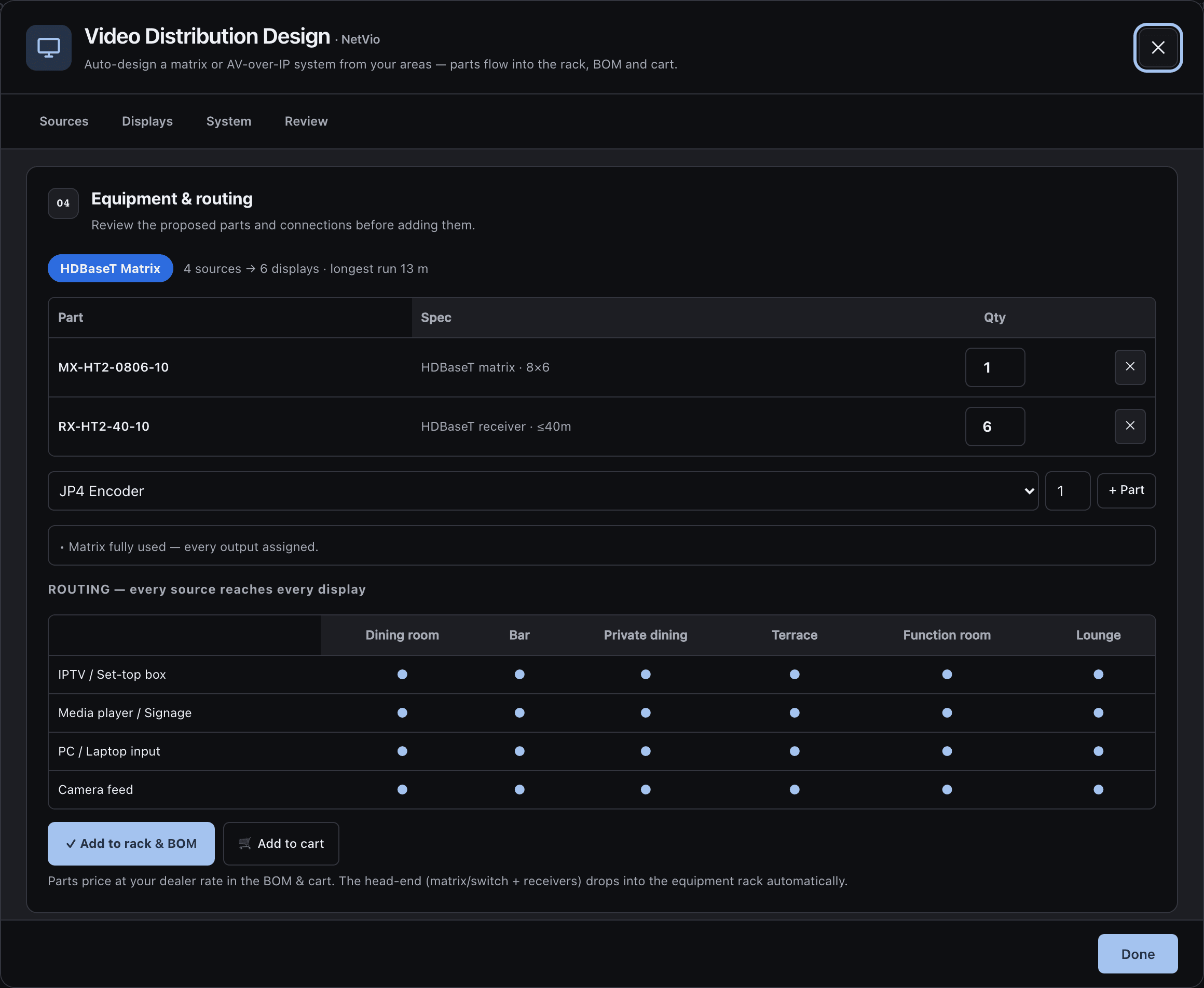
The video designer works out how a picture gets from each source to each screen on the job, and it is matrix first. It picks the smallest HDBaseT matrix that fits your sources and screens, and a receiver at each display rated for its cable run: 40 m or 70 m. When no matrix fits, it switches to AV over IP: an encoder per source, a decoder per screen, a controller and a PoE switch. The parts are Netvio.
You add several sources at once and set one display per area, with a screen count and a resolution. Cable runs are measured from the plan, and you can type a length on any screen to override the measured run.
The single-line diagram draws the video end to end: every source, the matrix, a receiver behind each screen and the screens themselves. Netvio, Nice and ELAN devices appear with their real rear panels, so the connections drawn are the ones on the back of the box. In the reports the screens and receivers show as icons on the plan, and a project with video only prints a video report with no audio sections.
A control system sized for the job
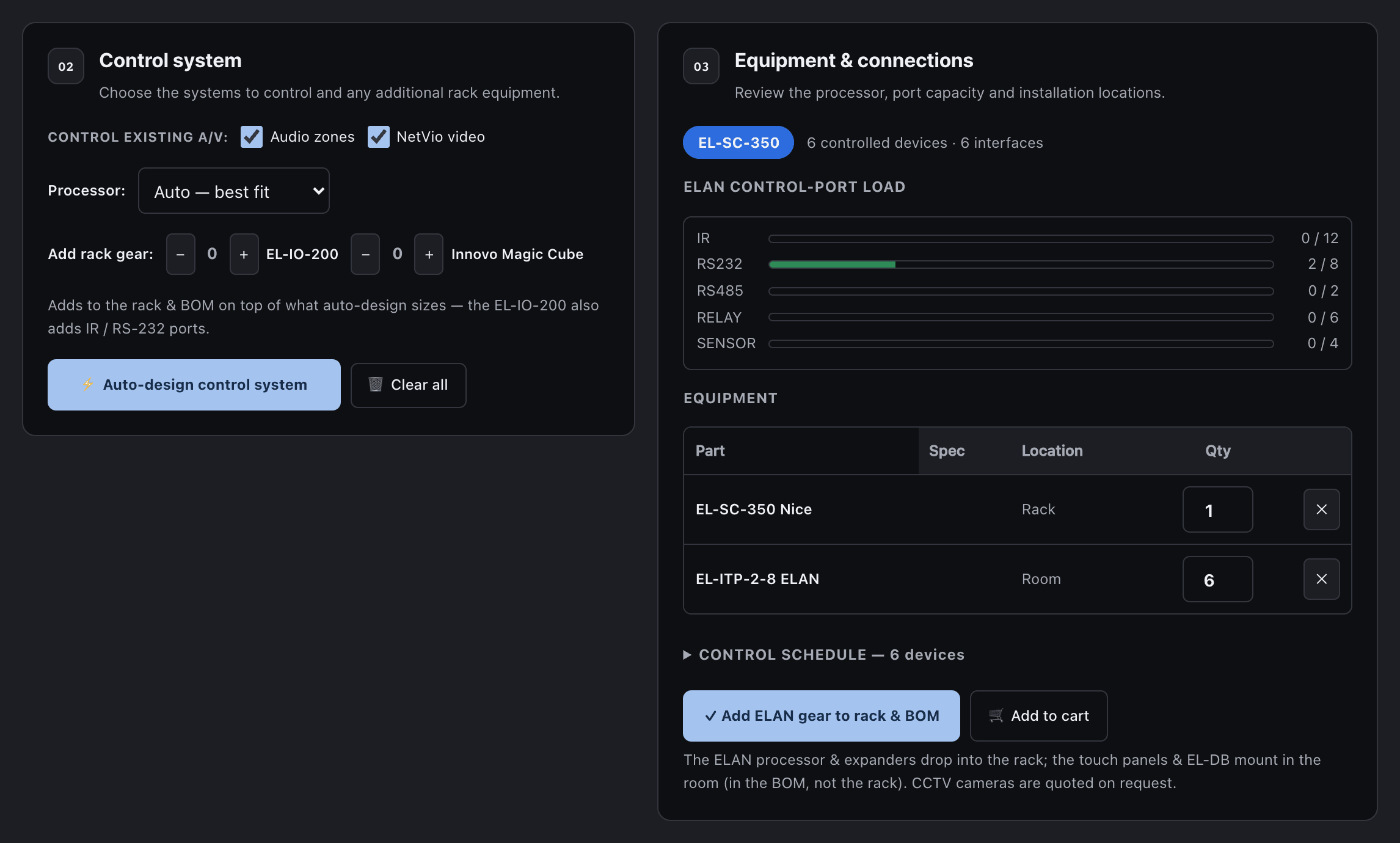
The control designer sizes an ELAN system for the touch interfaces on the job. For each area you say how many ELAN touch panels, Innovo touch screens, ELAN video door stations and cameras it has, and tick whether to fold in the audio zones and the video you have already designed. From that it picks the controller, an EL-SC-150 for a small job or an EL-SC-350 for a larger one, and adds EL-IO-200 expanders when the IR or RS-232 ports run out.
You get a port-load readout, checks, and a control schedule that lists every device with its area and how it is wired. The controller and expanders go into the rack and the bill of materials; the panels and door stations go into the bill of materials for the rooms they mount in. The client proposal gains a control and automation section with the full schedule.
A diagram that routes itself
Version 1.4.0 also added an automatic router to the single-line diagram. Cables run around the equipment and around each other instead of through the blocks, and parallel runs are kept apart in clean vertical channels, so a large system stays readable. Wiring you draw or edit by hand is kept and routed the same way.
On a large system the diagram PDF used to crop the wiring. It now captures the whole drawing, every route included.
Why it matters
A job rarely stops at speakers. With video and control designed on the same plan, the rack holds the matrix and the controller beside the amplifiers, the bill of materials counts them once, and the installer gets one wiring diagram instead of three. Since version 1.8.0, each area can also choose a TV, an LED screen or a projector, and that choice follows through to the schedule, the report and the wiring.
Release notes
v1.4.0 Video distribution design (Netvio), and a single-line diagram router
- 3 new items
- 1 fix
- New
Video distribution design: the smallest HDBaseT matrix that fits your sources and screens, with a receiver at each display rated for its cable run, 40 m or 70 m. It switches to AV-over-IP when a matrix cannot fit.
- New
The single-line diagram draws the video system end to end, with the real rear panels of Netvio and Nice ELAN devices.
- New
An automatic wire router: cables route around the equipment and around each other, in clean corridors. Wiring drawn by hand is kept.
- Fixed
The single-line diagram PDF captures every wire route on large systems.
Release notes
v1.5.0 Control and automation design (ELAN)
- 2 new items
- New
Control and automation design sizes an ELAN system for the touch panels, door stations and cameras on the job: an EL-SC-150 for small jobs, an EL-SC-350 for larger ones, and EL-IO-200 expanders when the ports run out.
- New
A port-load readout, validation and a control schedule. The controller and expanders go into the rack and the BOM, and the client proposal gains a Control and automation section.