Skip to content

CCTV, 03

Camera views, graded for detail.

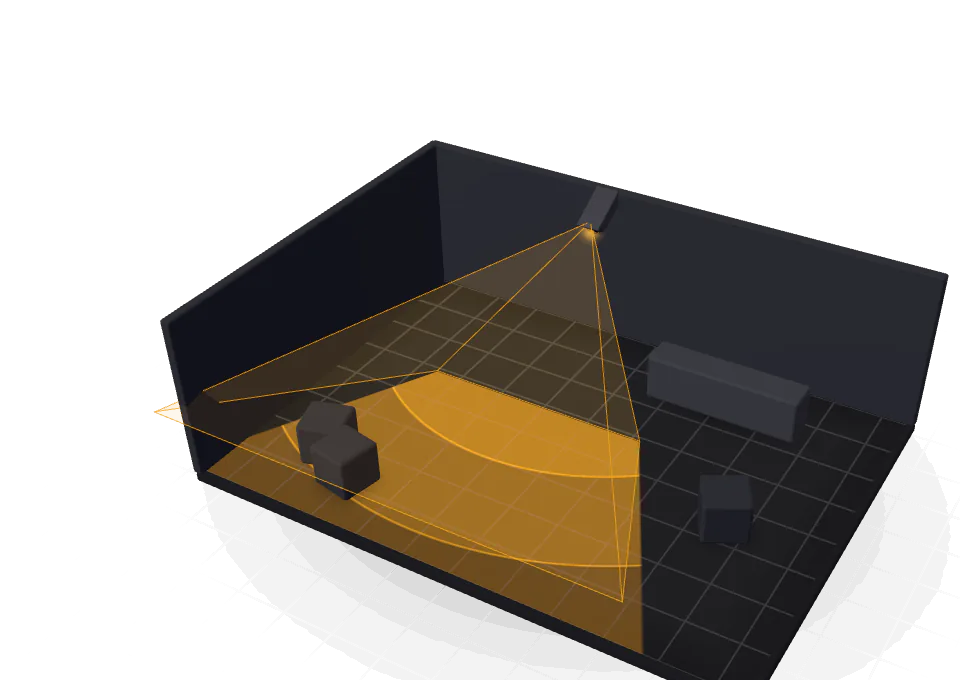
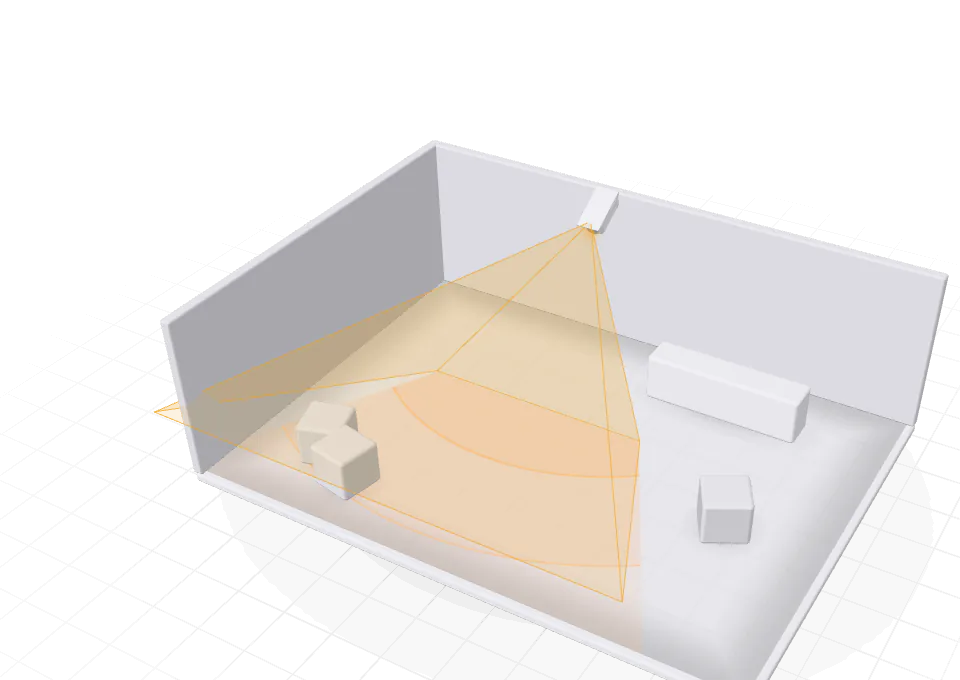
Place cameras on the plan and their views stop at the walls. A pixel-density map grades every spot for detect, observe, recognise and identify per EN 62676-4, and the recorder card sizes the NVR, the storage and the PoE budget for your retention.

Illustrative preview built for this page. The tool computes the real figures.

what it answers, 04

Four questions a client asks after the first incident.

  • Will this camera identify a face at the door?

    Being in the field of view is not enough. The pixel-density map colours the floor by pixels per metre, and the lens calculator gives the focal length that reaches the detail you need at a distance.

    Pixel-density map
  • Is the till covered to the grade we promised?

    Draw a coverage zone over the till, the door or the gate and set the grade it must meet. Any gap shows in red.

    Coverage zones

  • How many cameras, and where?

    Auto-place covers each area to the target grade with as few cameras as possible, at the entrances and corners. Then re-aim them to taste.

    Auto-place

  • How big does the recorder need to be?

    Set the retention in days, continuous or motion recording, the codec, the frame rate and how busy the scene is. The recorder card picks the NVR channels, sizes the storage and checks the PoE budget.

    Recorder and storage

how it works, 05

Place, aim and grade, then size the recording.

The steps of the tool’s CCTV guide, and the CCTV part of lesson 04.

  1. Choose a camera

    Open the camera library and check each model’s resolution, lens and field of view before you place it.

  2. Place and aim it

    Click where it mounts and choose ceiling or wall; a wall camera snaps flush and faces into the room. Drag inside the cone to aim it.

  3. Check the image detail

    Show the field of view with its DORI zones, then the pixel-density map. Look at the doors, the till and every spot a client will ask for evidence.

  4. Size the recording

    Set retention, recording mode, codec and frame rate. Check the channels against the cameras, the storage against the retention and the PoE against the load.

  5. Check it in 3D

    The 3D view stands every camera and its footprint in the room: the quickest way to check mounting heights and the blind spot under each camera.

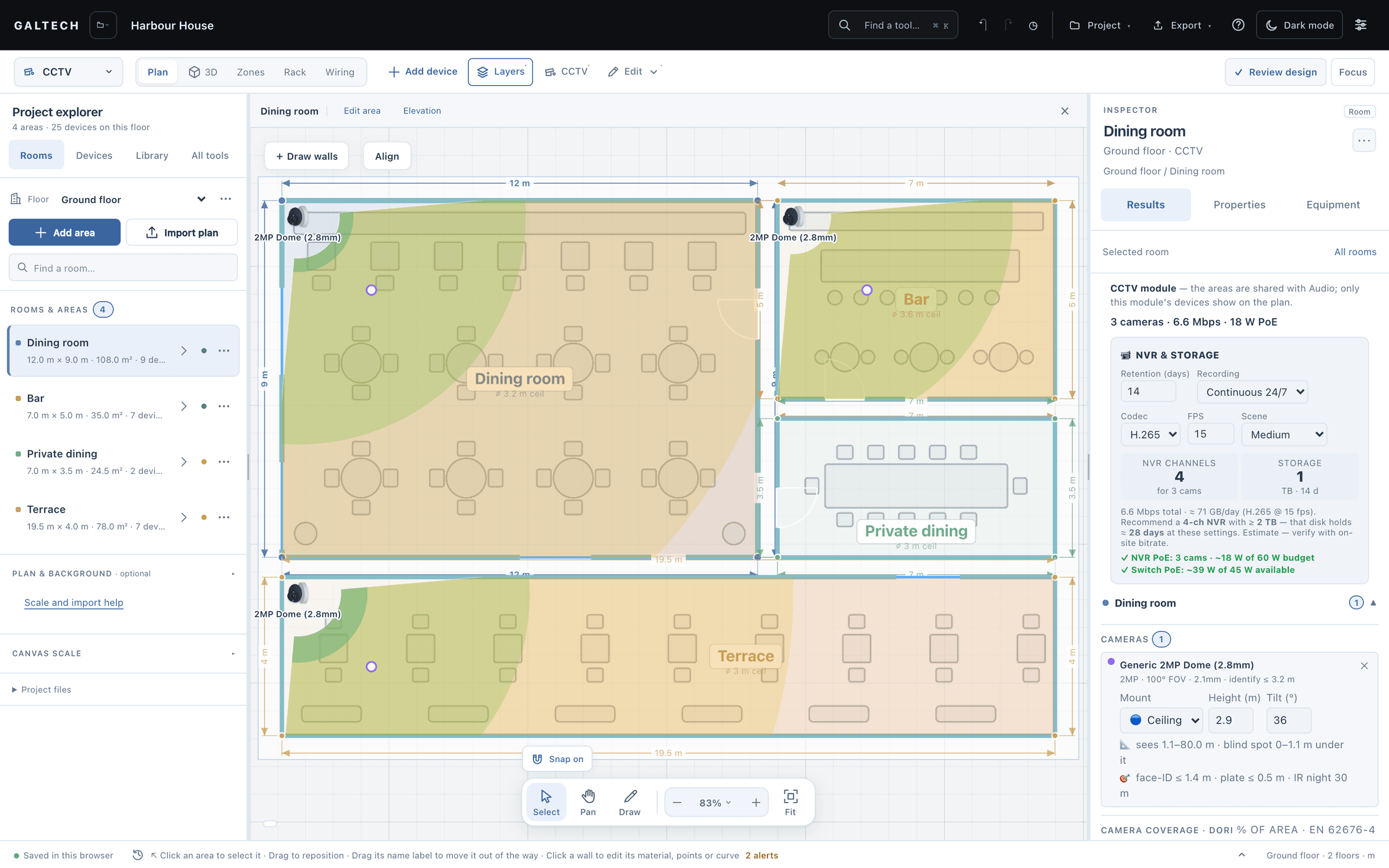
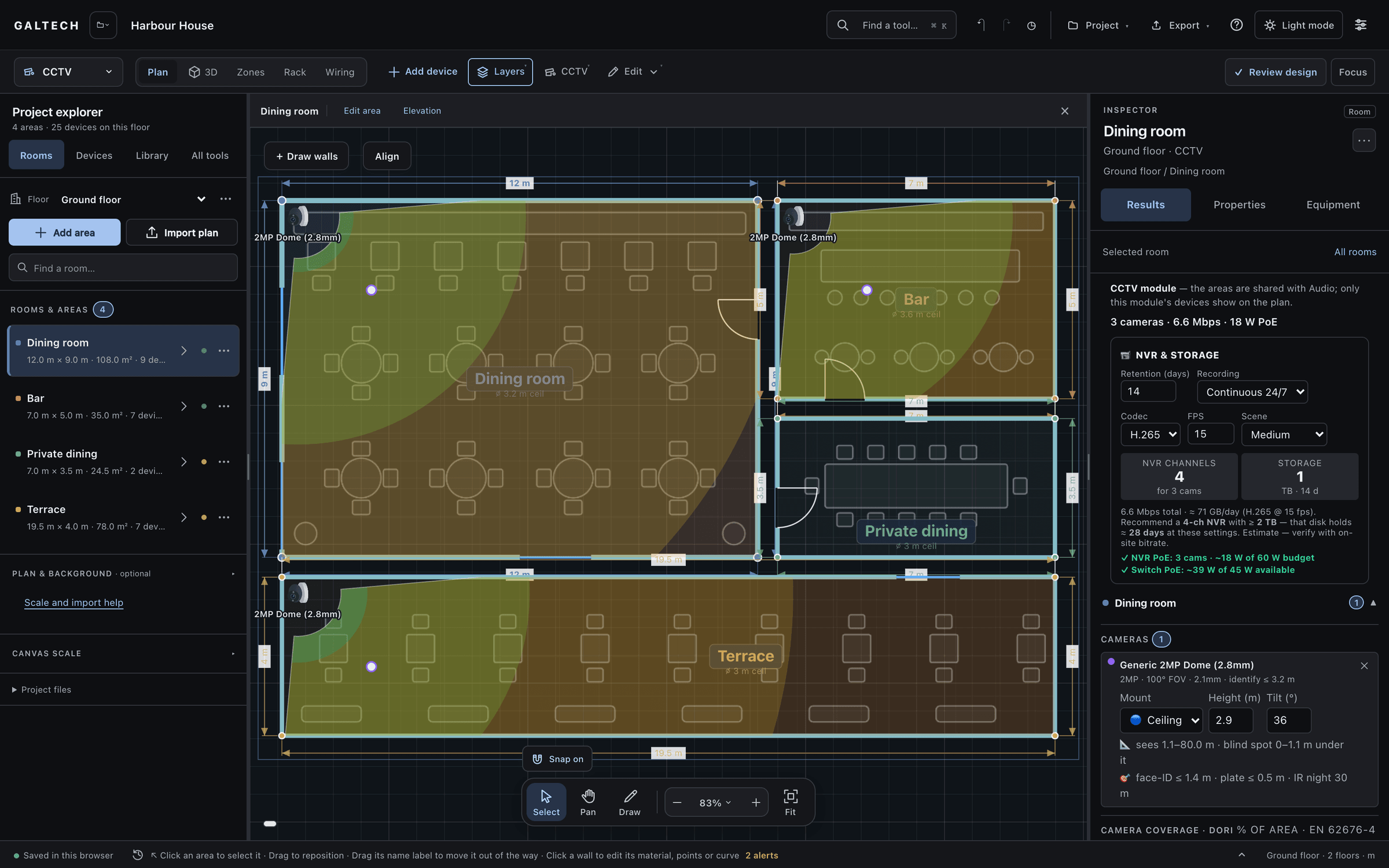
The CCTV module in the dark theme: camera views clipped by the walls on the near-black plan, and the Inspector sizing the recorder for 14 days of continuous H.265 at 15 fps: a 4-channel NVR, 1 TB of storage and the PoE budget for 3 cameras.
The CCTV module: camera views clipped by the walls on the plan, and the Inspector sizing the recorder for 14 days of continuous H.265 at 15 fps: a 4-channel NVR, 1 TB of storage and the PoE budget for 3 cameras.

recorder and storage

Five settings in, a recorder and a disk out.

The recorder card sits in the Inspector beside the plan, so the storage follows every camera you add.

You set

  • Retention, in days
  • Recording: continuous or motion
  • Codec
  • Frame rate
  • Scene activity

It works out

  • NVR channels for the camera count
  • Storage for the retention, with a recommended disk
  • The cameras against the NVR’s PoE budget
  • The switch’s PoE against what it supplies

“A recorder with eight channels and a switch with four powered ports is a common mistake, and the tool will show it.”

Lesson 04, “Recorder and storage”, from 4:39
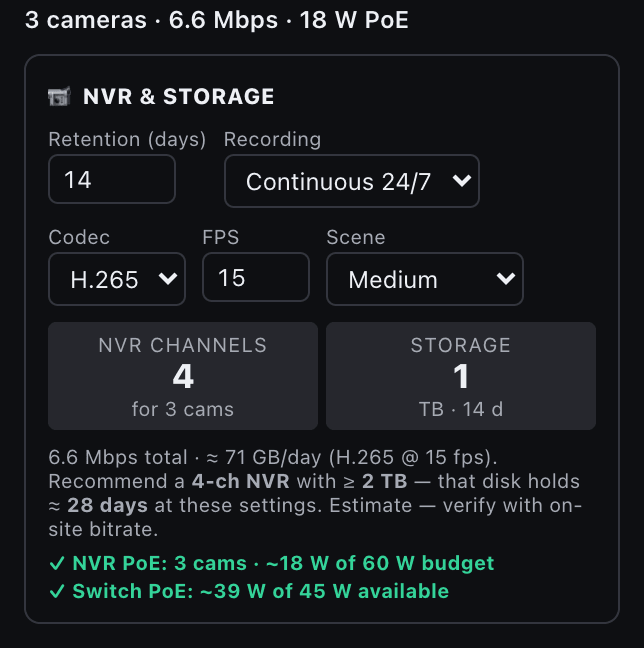
The CCTV recorder card in the dark theme: 3 cameras at 6.6 Mbps and 18 W of PoE, 14 days of continuous H.265 at 15 fps, a 4-channel NVR and 1 TB of storage at about 71 GB a day, with a 2 TB disk recommended, and the PoE audit: the cameras draw about 18 W of the NVR’s 60 W budget, and the switch about 39 W of the 45 W it supplies.
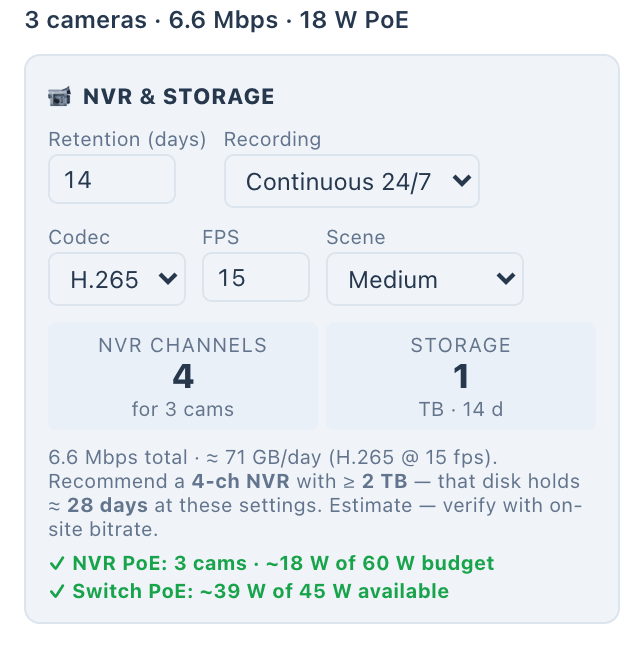
The CCTV recorder card: 3 cameras at 6.6 Mbps and 18 W of PoE, 14 days of continuous H.265 at 15 fps, a 4-channel NVR and 1 TB of storage at about 71 GB a day, with a 2 TB disk recommended, and the PoE audit: the cameras draw about 18 W of the NVR’s 60 W budget, and the switch about 39 W of the 45 W it supplies.
The recorder card in the demo project: the settings at the top, the NVR channels and storage below, and both PoE budgets checked at the foot.

the analysis

What is graded, and what is only estimated.

DORI is the one figure here graded per a named standard. Storage is an estimate; ports and PoE are counts.

DORI grades: detect, observe, recognise, identifyEN 62676-4
4
cameras in the catalogue
34
NVRs in the catalogue
12
  • DORI grade

    Graded per a standard
    How it is worked out
    Pixels per metre on the target, from each camera’s resolution and lens at distance. Each area shows the share where each grade is met.
    Judged against
    EN 62676-4: detect, observe, recognise and identify.
  • Coverage zone

    Checked against a target
    How it is worked out
    The grade reached across a zone you draw over a door, a till or a gate.
    Judged against
    The grade you set for that spot. Gaps show in red.
  • Storage

    Planning estimate
    How it is worked out
    Retention days, resolution, frame rate, codec, recording mode and scene activity give a daily volume and a disk size.
    Judged against
    A recommended disk. Verify it with the bitrate on site.
  • Recorder channels and PoE

    Counted
    How it is worked out
    Channels against the camera count; the cameras’ PoE draw against the recorder’s and the switch’s budgets.
    Judged against
    The NVR and switch in the design.
  • Field of view

    Planning estimate
    How it is worked out
    Each view clipped by the walls on the plan, and stood in the room in 3D.
    Judged against
    Your check of mounting heights and the blind spot under each camera.

what you hand over, 04

A camera schedule the installer can mount from.

    • PDF

    CCTV report

    Its own branded PDF: the coverage plan with the pixel-density map, the camera schedule with model, mount, height, lens and the grade each reaches, the coverage zone check, and the NVR and storage sizing.

    For: Client and installer

    • PDF

    Priced in the proposal

    Cameras and the recorder the design needs are priced lines in the client proposal: the cameras under their area, the recorder in a CCTV group.

    For: Client

    • PDF
    • PNG
    • DXF

    On the wiring drawing

    Every camera is drawn wired to the network switch over PoE, each link with a cable ID in the connection schedule.

    For: Installer

    • PDF

    Location references

    Cameras carry C1, C2 references in the report that match the location schedule.

    For: Installer

in the catalogue

Cameras and recorders, with their sensors, lenses and PoE draw.

  • 34

    cameras

    29 named models and 5 generic ones.

    By type

    • Bullet13
    • Turret8
    • Dome6
    • PTZ5
    • Fisheye2

    By maker

    • Nice10
    • Dahua5
    • Hikvision5
    • Ubiquiti4
    • Axis3
    • Bosch2
  • 12

    NVRs

    8 named models and 4 generic ones.

    By maker

    • Hikvision3
    • Dahua2
    • Ubiquiti2
    • Axis1

Counts are the tool’s built-in catalogue in v2.0.0. Brand and product names in the catalogue belong to their owners. A product in the catalogue does not mean a partnership.

honest limits

A grade is a pixel count, not a picture.

  • Graded from the datasheet

    DORI grades come from the camera’s resolution and lens at a distance. They tell you whether enough pixels land on a face; look at the real image at commissioning.

  • In view is not the same as identified

    A spot inside the field of view can still lack the detail you need. Check the grade, or the pixel density, at the distance that matters.

  • Storage is an estimate

    The recorder card sizes the storage from the settings you choose. Verify it against the bitrate on site before you order the disks.

faq

Questions about CCTV design.

What do the DORI grades mean?

Detect, observe, recognise and identify: four levels of detail, graded per EN 62676-4 from the pixels per metre a camera puts on a target at a distance. The tool shows the share of each area where each grade is met.

How is the storage worked out?

From the retention in days, continuous or motion recording, the codec, the frame rate and how busy the scene is. The card recommends the NVR channels and a disk size. Treat it as an estimate and check the bitrate on site.

Can I add my own cameras?

Paid accounts can add their own products, switched on per account on request. It is not part of the trial.

Type in the datasheet: resolution, sensor, lens or field of view, IR range and PoE draw. The camera then works like a built-in one, in the DORI maths, the schedules, the rack, the wiring and the reports.

Does it check PoE?

Yes. The recorder card checks the cameras against the NVR’s PoE budget and the switch’s, and the port check warns when switch ports run short.

Show the detail before a camera goes up.

Cameras, grades and storage on the same plan as the rest of the system.

15-day trial for approved companies. No card, nothing to cancel.

Search the site