Skip to content

Audio, 01

Speaker layouts with the coverage on the plan.

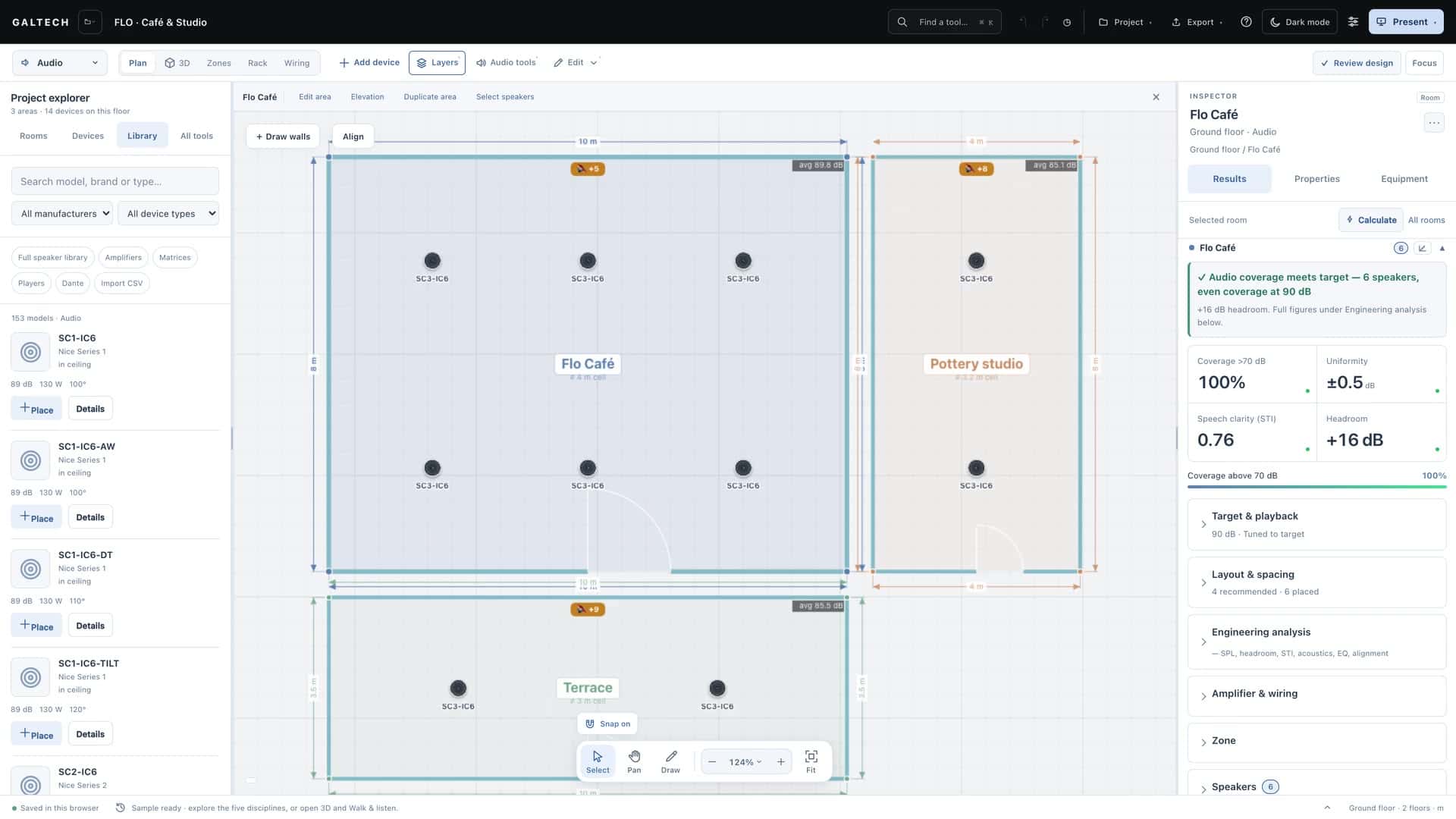
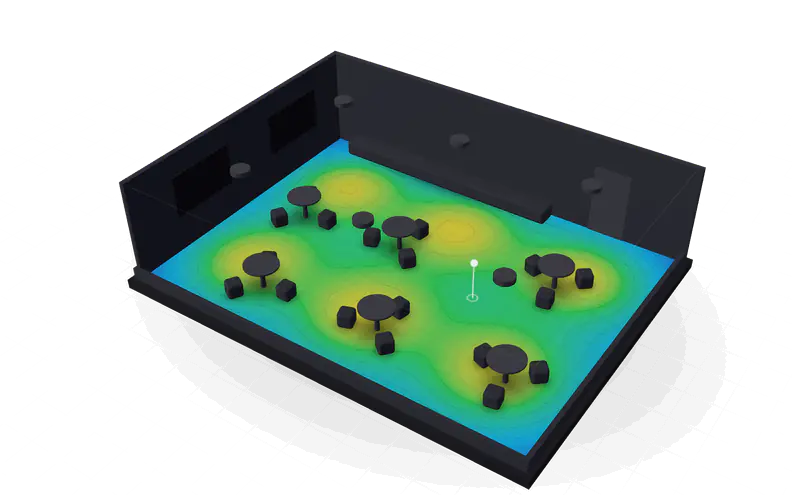
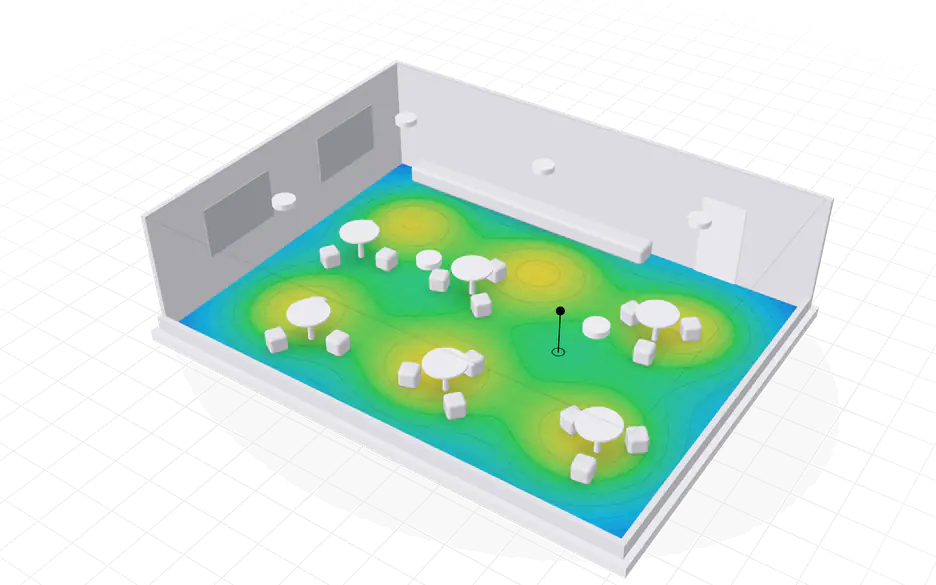
Place real speakers on the floor plan and the SPL heatmap redraws as you drag. Every area gets its level, uniformity, STI and RT60, and the zones, amplifier channels and cable gauges follow from the same layout.

7688 dBIllustrative preview built for this page. The tool computes the real figures.

what it answers, 05

Five questions every audio design must answer, before anything is bought.

  • How many speakers does this room need?

    The Coverage Advisor sizes the count from the area, the model’s coverage and the target level, shows the grid and lays it out in one click. Even spacing suits speech; Economy stretches it for background music with fewer speakers.

    Coverage Advisor
  • Will it be loud enough where people are?

    Set a target level per area, then drop standing or seated listeners at their real ear height, 1.7 m or 1.2 m. Levels are tuned to the target at those points, and each area shows its continuous level, peak capability and headroom.

    Target SPL and listeners

  • Will the announcements be understood?

    STI is estimated per IEC 60268-16 from the reverberation and the room’s background noise, and checked against a target of 0.60. C50 and C80 report the clarity of speech and of music.

    Speech intelligibility

  • Is the room too live?

    RT60 comes from the floor, ceiling and wall finishes, the occupancy and the furnishing, in octave bands. When a room is too reverberant, the treatment advisor gives the square metres of absorption to add and the STI after treatment.

    Area acoustics

  • Which amplifier, which channels, which cable?

    Every area starts as its own zone. Assign amplifier units, wire Single or Parallel at low impedance or on a 70 V or 100 V line, and the cable gauge is chosen to keep the loss within budget.

    Zones and amplifiers

how it works, 05

From an empty room to a system you can quote.

The same steps as the tool’s task guides, and lesson 02 of the Learning Centre.

  1. Set the room and its target

    Give the area its length, width, ceiling and ear height, or start from one of the 14 venue presets, which fill in the target level, RT60, noise floor and spacing.

  2. Place speakers from the library

    Search the library and place a model. Then set its distance from each wall, its height and its mount, and choose whether it moves freely or sticks to the nearest wall.

  3. Aim it without moving it

    Pan and tilt change the direction and keep the position. The vertical coverage view shows where the beam meets the listening height.

  4. Read the heatmap and the results

    Turn on the SPL heatmap and the coverage circles, look for quiet gaps and hot spots, and compare each area’s minimum, maximum, average, uniformity and STI.

  5. Build the system around it

    Assign amplifier channels in Zones, fill the rack and draw the wiring from the same project. Then review it in 3D, walk and listen, and share the room with the client.

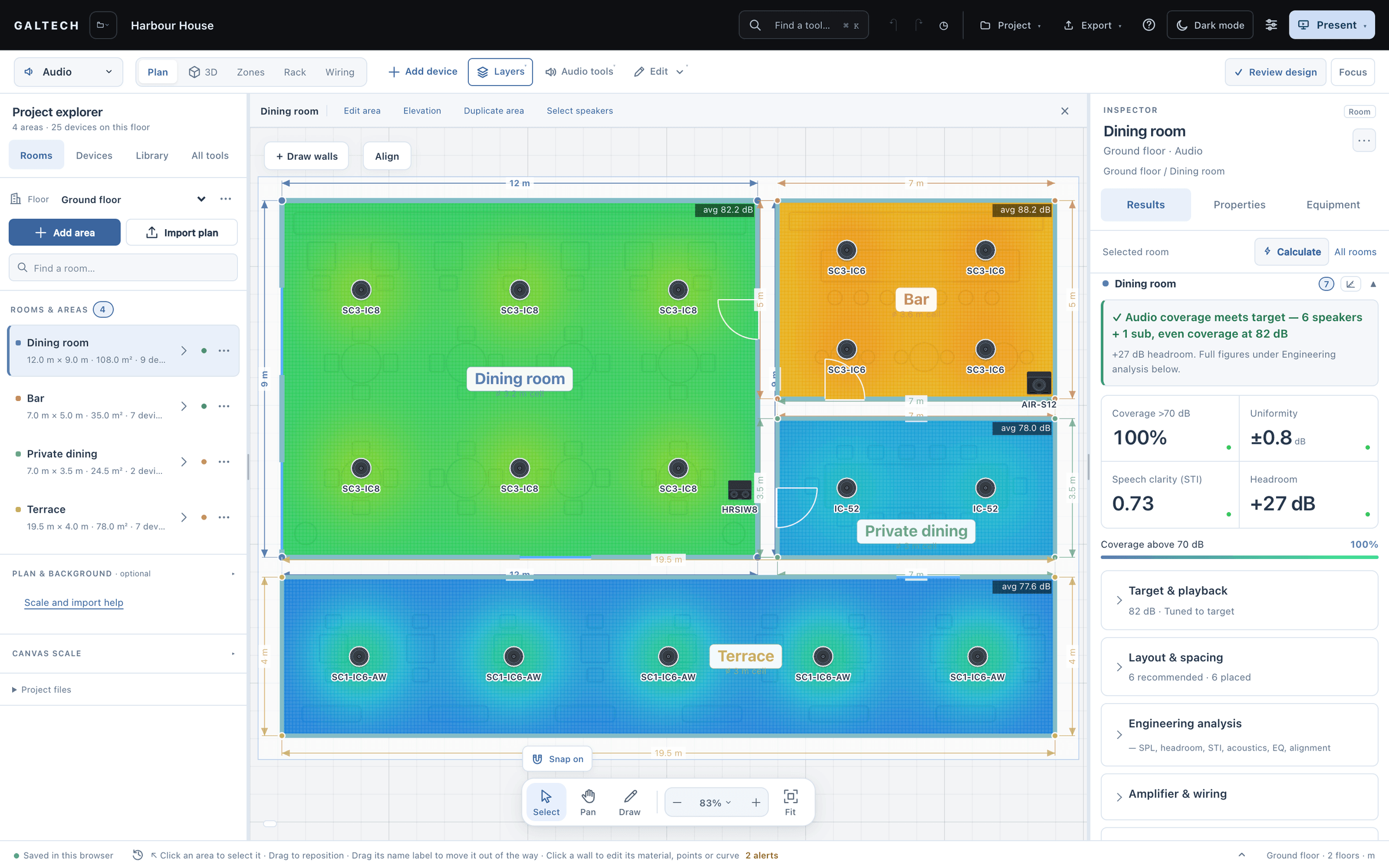
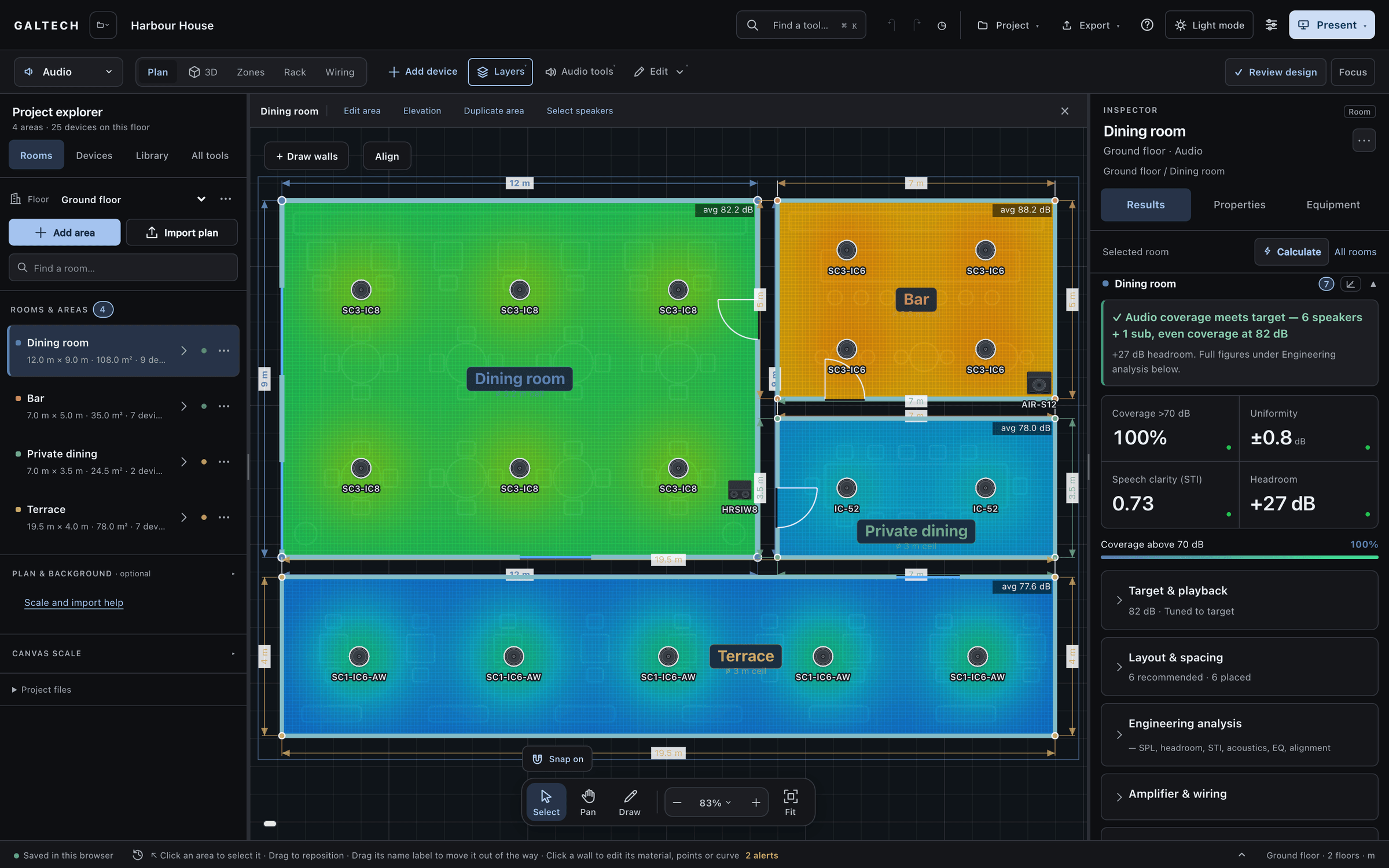
The dark workspace on the Harbour House ground floor: four areas on an SPL heatmap over the near-black plan, the dining room green, the bar orange, private dining and the terrace blue, each speaker labelled by model. The Inspector shows the dining room at 100% coverage, ±0.8 dB uniformity, STI 0.73 and +27 dB headroom.
The design workspace on the Harbour House ground floor: four areas on an SPL heatmap, the dining room green, the bar orange, private dining and the terrace blue, with each speaker labelled by model. The Inspector shows the dining room at 100% coverage, ±0.8 dB uniformity, STI 0.73 and +27 dB headroom.

zones and amplifiers

The layout becomes a system: zones, channels and cable.

Every area is its own zone from the start. Group areas onto one source when the job calls for it, flag a zone for paging, and give it a level offset that the prediction follows.

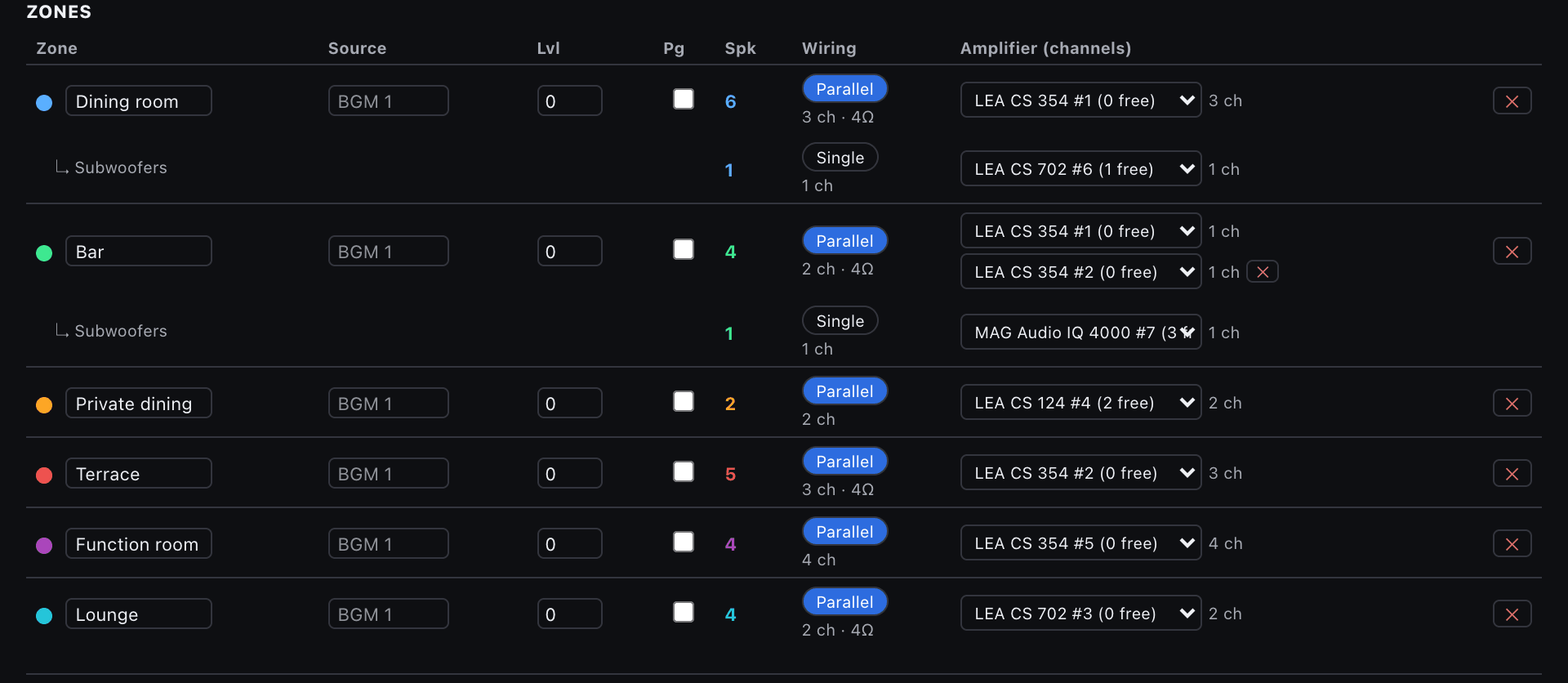
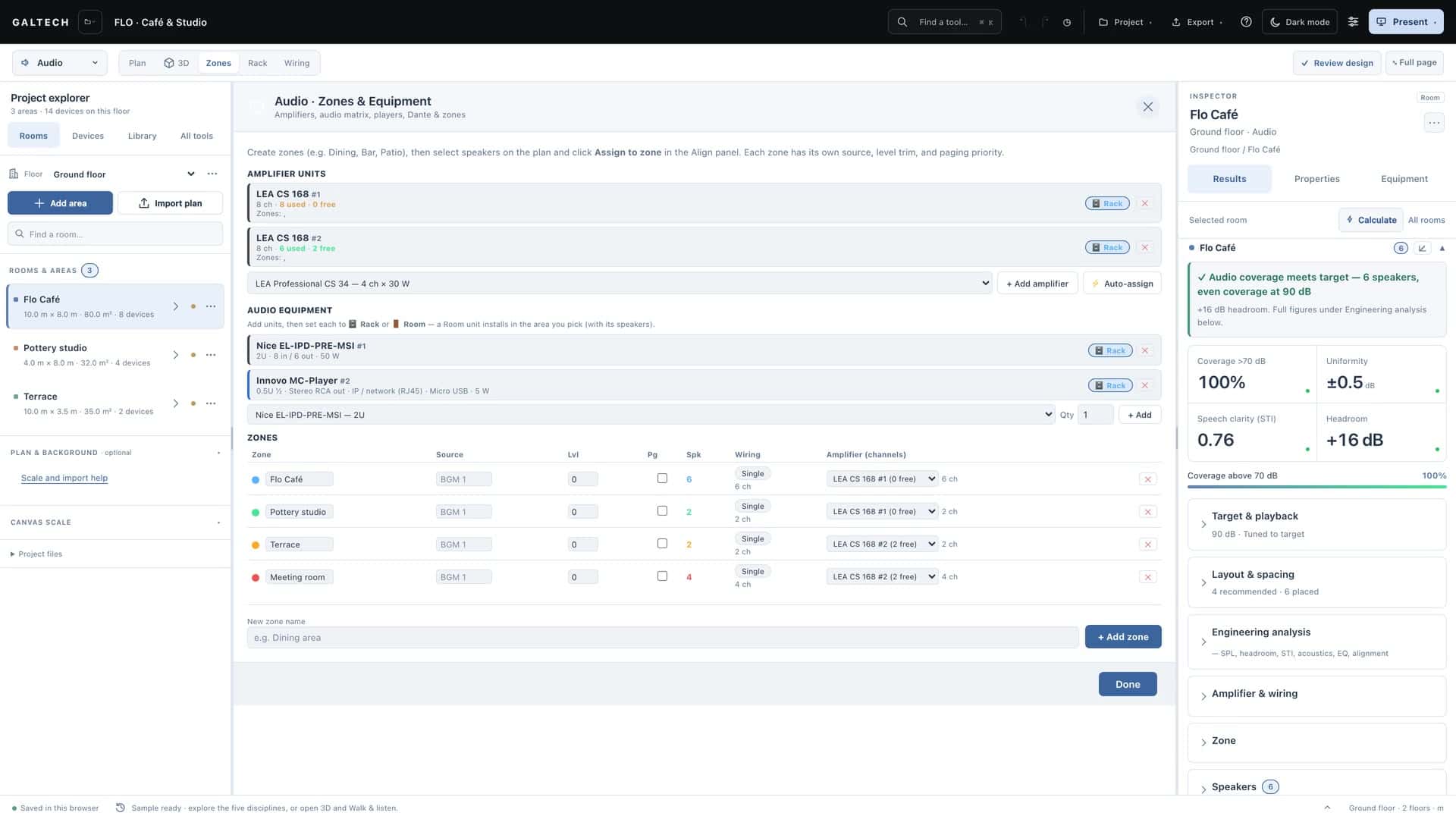
The zones table in the dark theme: six zones from the dining room to the lounge, each with its source, level, paging, speaker count, Parallel or Single wiring with channels and impedance, and the amplifier channels assigned to it, with the dining room and bar subwoofers on their own rows.
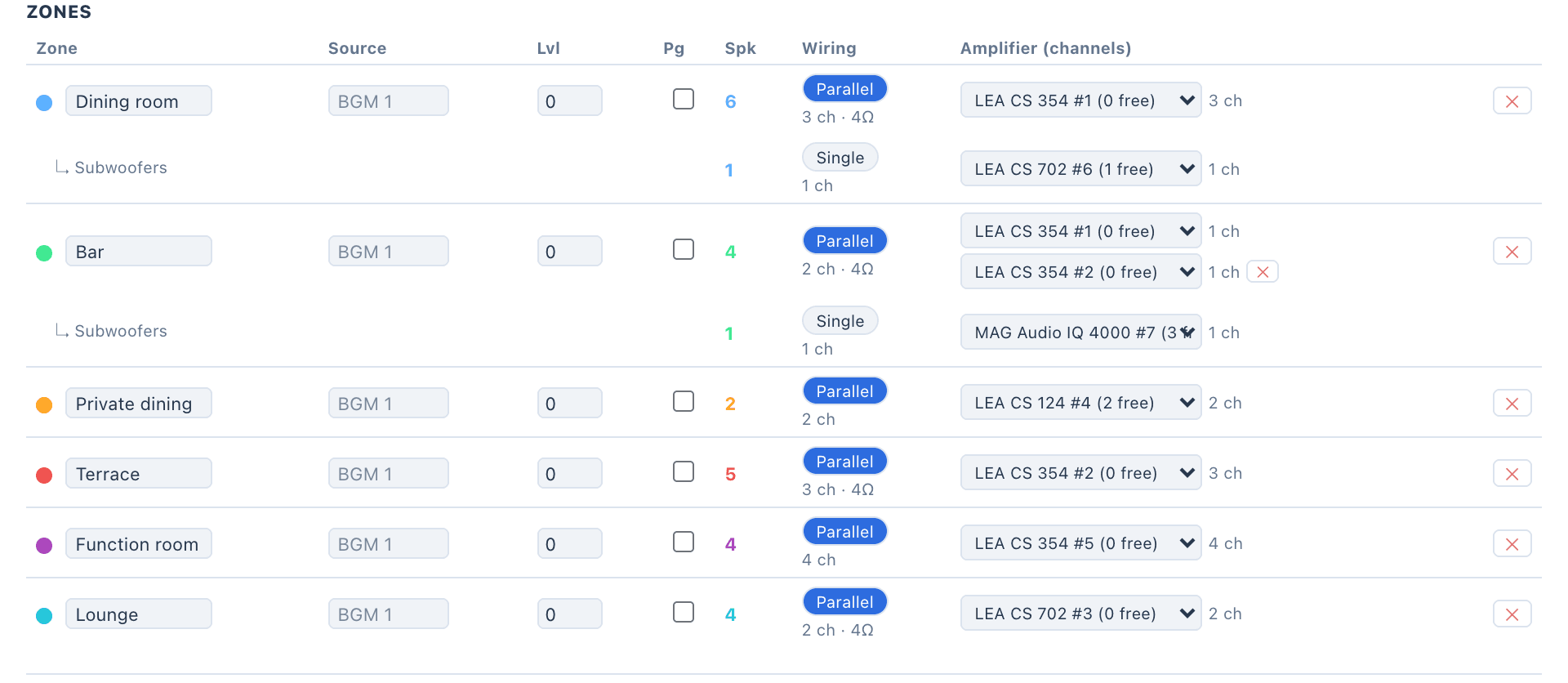
The zones table: six zones from the dining room to the lounge, each with its source, level, paging, speaker count, Parallel or Single wiring with channels and impedance, and the amplifier channels assigned to it, with the dining room and bar subwoofers on their own rows.
The Zones view in the demo project: each zone’s source, level, paging, wiring and amplifier channels.
  • Single or Parallel

    One channel per speaker, or two 8 Ω speakers on one 4 Ω channel. Each amplifier shows the channels it has used and the ones still free.

  • 70 V and 100 V lines

    Dual-voltage speakers ride the line, capped at their largest tap, while a subwoofer in the same zone keeps its own low-impedance channel. Line speakers daisy-chain in the wiring diagram.

  • A zone can span amplifiers

    Five speakers on a four-channel unit: the fifth rides a second unit. Until it does, the heatmap and the verdict show that speaker unpowered.

  • Cable gauge from a loss budget

    Residential low-impedance runs stay within 7% of the channel impedance, about 0.3 dB, professional runs within 5%, and 70 V or 100 V lines within a 10% voltage drop.

the analysis

Every figure, and what it is judged against.

The standards check marks each area pass, marginal or fail against common design goals. This is how each figure is worked out.

STI targetIEC 60268-16
0.60
rays per speaker in the Ray-Traced Check (beta)
24,000
venue presets with their own targets
14
  • Level and coverage

    Checked against a target
    How it is worked out
    The direct sound from each speaker’s datasheet sensitivity, power and coverage, plus the room’s reverberant field.
    Judged against
    The area’s target level, the share of the area above it, and the uniformity.
  • Speech intelligibility (STI)

    Checked against a target
    How it is worked out
    Estimated per IEC 60268-16 from the RT60 and the background noise floor, so a noisy restaurant scores lower than a quiet boardroom.
    Judged against
    A target of 0.60.
  • Reverberation (RT60)

    Planning estimate
    How it is worked out
    Sabine or Eyring from the surface finishes, per octave band, with occupancy and furnishing. Or typed in.
    Judged against
    A DIN 18041-style curve for the room’s volume, used as a reference.
  • Headroom

    Checked against a target
    How it is worked out
    The continuous level with every speaker at full drive, then the peaks, as far as the assigned amplifier can deliver them.
    Judged against
    Peaks 6 dB over the target count as good headroom.
  • Low frequency

    Checked against a target
    How it is worked out
    Eight octave bands from 63 Hz to 8 kHz. A subwoofer counts where it plays, below about 150 Hz.
    Judged against
    The low-frequency extension, and the sub level against the mains.
  • Signal to noise

    Checked against a target
    How it is worked out
    The level against the area’s background noise floor.
    Judged against
    +25 dB for music, +15 dB for speech.
  • Ray-Traced Check (beta)

    Cross-check, in beta
    How it is worked out
    24,000 rays per speaker through the real walls, openings and materials, giving RT60, C50 and STI at each listening point.
    Judged against
    The statistical model at the same points. Where they differ, the trace is the one to trust.

what you hand over, 06

From the same design, the paperwork for every reader.

    • PDF

    Audio design report

    Per-area plans and SPL heatmaps, a standards table, a QR code to each area’s 3D tour, and an acoustics appendix with RT60 per octave, the materials, the ray-traced check and the treatment advice.

    For: Client and installer

    • PDF

    DSP preset sheet

    A channel strip for every output: level, polarity, filters, crossover, EQ, limiter and the time-alignment delay, then a calibration walk sheet speaker by speaker.

    For: Installer

    • PDF
    • CSV

    Zones and amplifiers in the proposal

    Zones print in the client proposal, and each amplifier unit becomes a line in the proposal, the bill of materials and the cable schedule.

    For: Client

    • CSV

    Installer pack

    The priced bill of materials with a speaker installation schedule, a cable schedule, a pull schedule per run, and a network and Dante schedule.

    For: Office

    • QR

    Share 3D

    A QR code that opens one area in 3D on the client’s phone, with each speaker heard from its real direction. Links last 90 days unless you revoke them sooner.

    For: Client

    • PDF

    Site tracking and calibration

    Measured SPL, STI and RT60 per area next to the prediction. A calibrated area prints as a site validation table, predicted against measured.

    For: Installer

Amplifiers, zones and the client proposal are Premium tools: part of the trial and of Professional, and earned by dealers with volume.

in the catalogue

Real products with real datasheets, ready to place.

  • 153

    speaker models

    From 7 makers, each placed at its true footprint with its datasheet sensitivity, power and coverage.

    By type

    • Surface mount44
    • In-ceiling35
    • Subwoofers35
    • In-wall19
    • Garden13
    • Corner mount7

    By maker

    • Garvan Acoustic59
    • Mag Audio32
    • Nice32
    • Cornered Audio10
    • Krix9
    • Stealth Acoustics7
    • Flat Panel Audio4
  • 34

    amplifiers

    15 of them with Dante.

    By maker

    • LEA Professional24
    • Mag Audio6
    • Nice3
    • Pulse-Eight1
  • 18

    audio matrices and Dante interfaces

    8 audio matrices and 10 Dante interfaces in the rack and gear library.

Counts are the tool’s built-in catalogue in v2.0.0. Brand and product names in the catalogue belong to their owners. A product in the catalogue does not mean a partnership.

honest limits

What the prediction is, and what it is not.

  • A planning baseline, not a guarantee

    The engine is a statistical model with an optional ray-traced check. The tool’s own help expects average level and coverage within about ±2 to 3 dB of a careful meter reading at mid and high frequencies, and ±3 to 6 dB at single points, steep angles and overlaps.

  • Bass in small rooms is approximate

    Below a room’s modal region no steady-state model resolves the peaks and nulls. Room modes and the sub placement ranking help you choose; the meter decides.

  • Standards as references, not verdicts

    STI is estimated per IEC 60268-16 and checked against 0.60. RT60 is compared with a DIN 18041-style curve as a reference. Neither says a room meets a standard.

  • Listening compares, it does not measure

    Walk and listen plays the predicted levels through your headphones or speakers. Use it to compare positions, never as the level on site.

faq

Questions about audio design.

Can it design 70 V and 100 V systems?

Yes. Set a whole area to 70 V or 100 V, or choose the connection per speaker. Power is capped at the speaker’s tap, a subwoofer keeps its own low-impedance channel, and line speakers daisy-chain in the wiring diagram.

How does it treat subwoofers?

A subwoofer plays below about 150 Hz, so it stays out of the broadband figures: adding one does not make an area read louder. It shows where it plays, in the 63 Hz and 125 Hz bands, the low-frequency extension and the sub level against the mains.

Optimise sub placement ranks candidate positions by how even the bass is across the listening area.

Can I use speakers that are not in the catalogue?

Paid accounts can add their own products, switched on per account on request. It is not part of the trial.

A custom speaker then behaves like the built-in ones.

Does it replace commissioning?

No. Commission with an SPL meter, and an STI or STIPA check for speech. Type the measured average into site calibration and the model trims itself to the room as built; site tracking keeps the measured figures next to the predicted ones.

keep going

Read it, watch it, then try it on a real room.

Design the sound before you sell it.

Lay out the speakers, check the coverage and hand over the paperwork from one project.

15-day trial for approved companies. No card, nothing to cancel.

Search the site