Audio
Amplifiers, low impedance and 70/100 V lines
Choose low impedance or a 70/100 V line per area or speaker, read the channels, power and cable size each area needs, and assign amplifiers that set the level.
On this page
How the speakers are wired decides how many amplifier channels a job needs, how much power each one must deliver and how thick the cable has to be. The tool works it out per area, and once you assign real amplifiers, the predicted level follows what they can actually deliver.
Amplifier and wiring, per area
Select an area and open Results → Amplifier & wiring.
- Low Z, 70 V or 100 V sets how the speakers in the area are connected. Low impedance is the default, for a small room with a few speakers. A 70 V or 100 V line suits long runs and many speakers, such as a corridor, and the speakers need a transformer tap for it.
- Cable run is the estimated length from the area to the rack.
The group then tells you how many channels the area needs, the power each channel must deliver, the amplifier it is assigned to, and the cable size it recommends. On a long run, it says when a thicker cable is needed to keep the loss down.
Low impedance or a line: per speaker
Dual-voltage models can run either way. The quickest route is the area’s 70V or 100V button: every main speaker in the area rides the line, and any subwoofer automatically stays on its own low-impedance channel. For control over one speaker, select it and choose its Connection in the speaker’s properties; it overrides the area’s mode.
On a line connection, a speaker’s power is capped at its largest tap, and the predicted level follows. Mixed zones work: line satellites and a low-impedance subwoofer in the same zone share one line channel for the mains, and the sub gets its own channel. In the wiring diagram, line speakers have a Line in and a Loop out, so you can daisy-chain them exactly as they are wired on site.
Cable sizes
The recommended gauge keeps the cable loss within a budget that suits the installation:
| Installation | Gauge | Loss budget |
|---|---|---|
| Residential background music | 16 to 12 AWG | Round-trip resistance within 7% of the channel impedance, about 0.3 dB. 16 AWG covers typical runs up to about 21 m at 8 Ω. |
| Professional runs: a Mag Audio amplifier or speaker, or any subwoofer | 12 to 8 AWG | Within 5% |
| 70 V and 100 V lines | Sized to the run | Voltage drop within 10% |
The amplifier library
The catalogue holds 34 amplifiers, with the full LEA Professional range built in. Open it from Audio tools, or from the amplifier list at the top of the Library tab. Paid accounts can add their own amplifiers too, switched on per account on request.
Assign amplifiers to zones
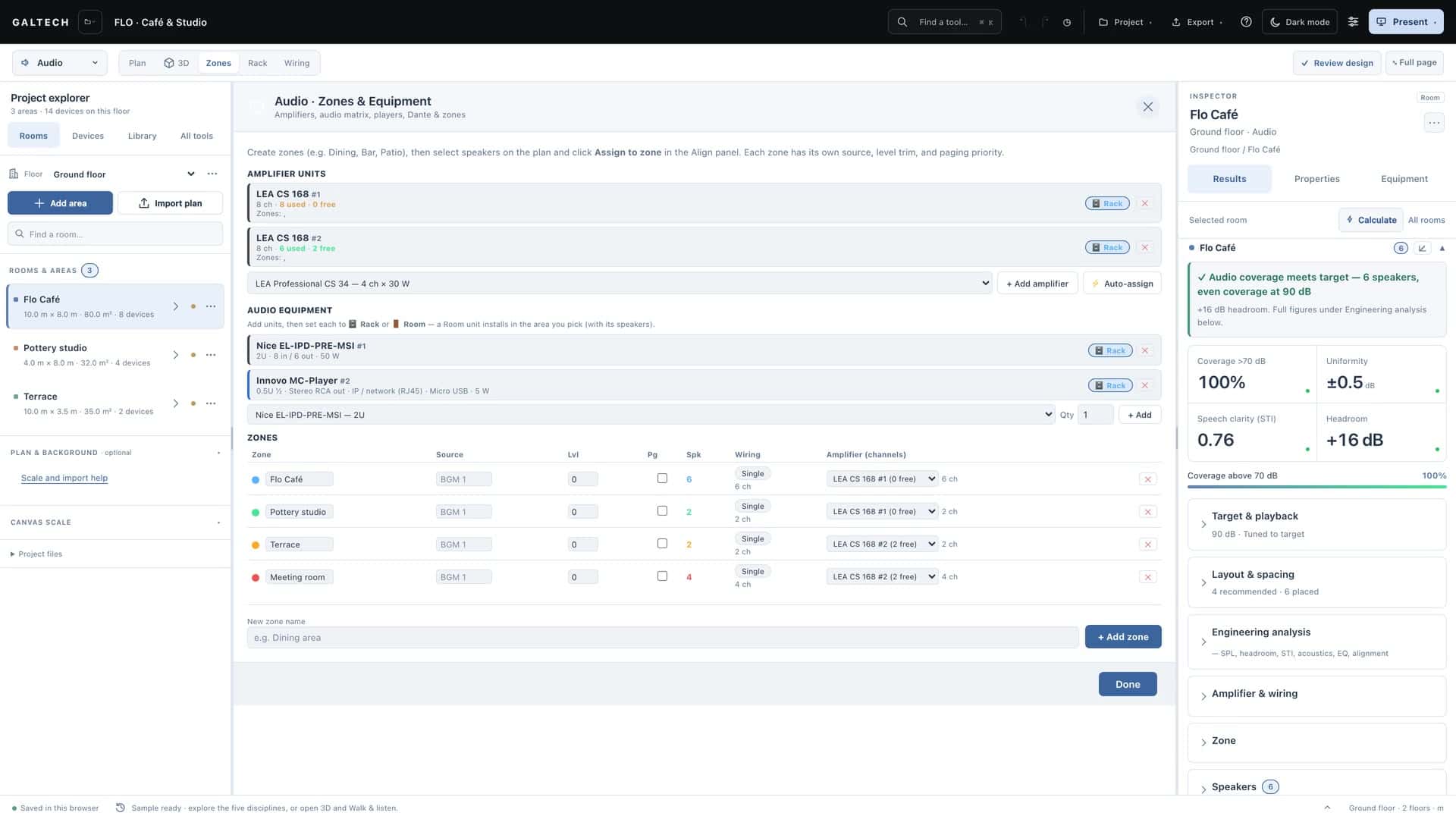
Amplifiers are assigned in the Zones view. Each area is a zone of its own, and each zone takes channels on an amplifier unit:
- Single wiring gives each speaker its own channel; Parallel puts two 8 Ω speakers on one 4 Ω channel. Four speakers take four channels single, or two in parallel.
- Each unit shows its used and free channels, so spare channels on one amplifier can serve another zone.
- A zone can span several amplifiers. Five speakers on a four-channel unit take all four channels there, and the zone shows 1 ch unpowered with a + amplifier picker. Choose a unit with free channels, or a new unit of the same model, for the remaining speaker. Until then that speaker gets no power, and the heatmap and the verdict say so.
- Auto-assign fills units for you as a starting point, splitting a zone across units when no single one has the channels.
Some speakers come with a recommended amplifier. Flat Panel Audio models are matched to the LEA CS 354 to 1504 family, and Mag Audio speakers and subwoofers always pair with Mag Audio amplifiers. The area’s results show the recommended amp.
See Organise zones, sources and paging for sources, levels and paging.
The level follows the amplifier
Once an amplifier is assigned, the predicted level reads it. An underpowered amplifier lowers the level across the heatmap and the results, so you can see when it falls short of the target; a capable one lets each speaker reach its full rated output, and never more. With no amplifier assigned, the map shows each speaker’s full capability. The headroom figures follow the same rule: see Frequency response, STI and the standards check.
In the paperwork
Every amplifier unit you place is added to the proposal, the bill of materials and the cable schedule, one line per unit, summed by model. Each area’s results and the amplifier plan show the amplifier that serves the zone and how many of its channels are in use. Power and heat are worked out at typical and heavy programme levels, not from the nameplate.
Note
For dealers, the amplifier library and zones design are part of Premium. Trials and Professional subscriptions include them. See For dealers.