Skip to content

Retail template

Even music on the shop floor, cameras on the door and the till.

The retail template opens a sales floor and a stock room with background music, two access points and two cameras, already calculated. No venue preset is a shop, so the template’s own values are the place to start.

Retail demo

Drawn to scale · 1 m grid

  • Areas at their real proportions, 1 m apart, as the template lays them out
  • Access point
  • Camera

the template

What Retail demo sets up when it opens.

Sales floor with even background music, storefront cameras and Wi-Fi. It opens as a project of its own with two areas at these sizes, every calculation done. Treat the values as a starting point, not a recommendation for your site.

  • 2 areas
  • 92 m² of floor in all
  • 2 access points, in the sales floor and stock room
  • 2 cameras, in the sales floor and stock room
The Retail demo template’s areas, as it opens. Every value is a starting point you can change in the area editor.
AreaSizeFloorCeilingEar heightRT60Target
Sales floor10 × 8 m80 m²3.4 m1.7 mstanding0.7 s85 dB
Stock room4 × 3 m12 m²3 m1.7 mstanding0.5 s85 dB
  • Sales floor10 × 8 m

    Floor
    80 m²
    Ceiling
    3.4 m
    Ear height
    1.7 m, standing
    RT60
    0.7 s
    Target
    85 dB
  • Stock room4 × 3 m

    Floor
    12 m²
    Ceiling
    3 m
    Ear height
    1.7 m, standing
    RT60
    0.5 s
    Target
    85 dB

design notes, 06

Designing a shop: evenness, detail and storage.

Even or economy spacing

Even spacing places speakers edge to edge, so their −6 dB coverage circles just touch: the smooth pattern a brand floor wants. Economy stretches the spacing by about 40% for the fewest speakers that still cover the area, accepted practice for background music. Switch between them on the area card and compare the count.
Shoppers stand

The sales floor’s listening height is 1.7 m under a 3.4 m ceiling, so each speaker throws 1.7 m to the ear. The grid is sized to a listening plane at least 1 m below the ceiling, and speakers are never packed closer than about 2 m.

There is no retail preset

None of the fourteen venue presets is a shop. Start from the template, or add areas as Custom with the Background music quick pick of 85 dB. A café inside the store can use the Coffee shop preset: 85 dB over 62 dBA.

Detail where it matters

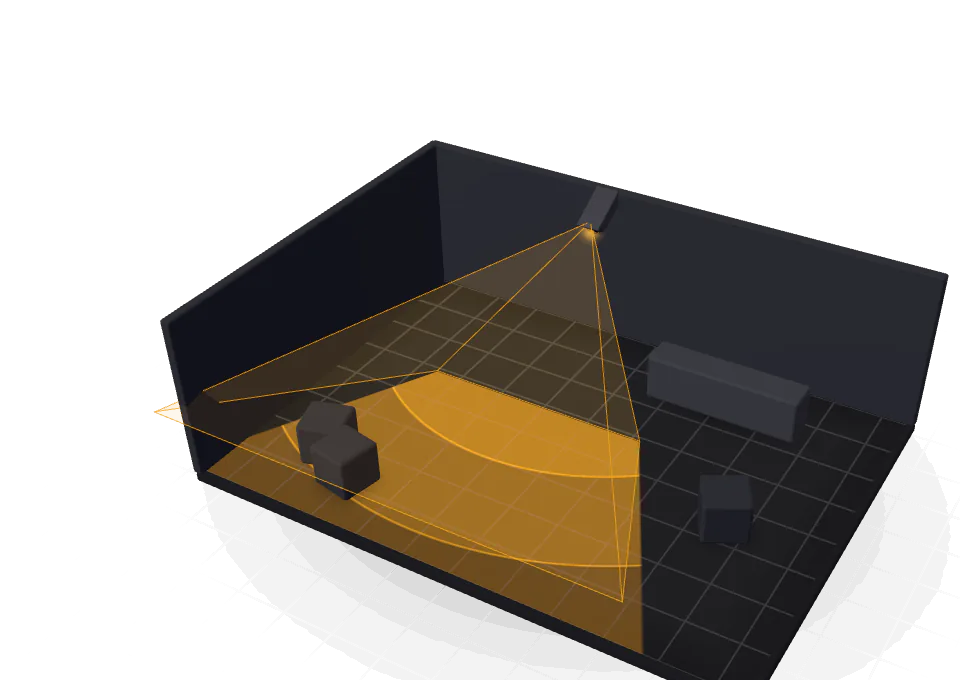
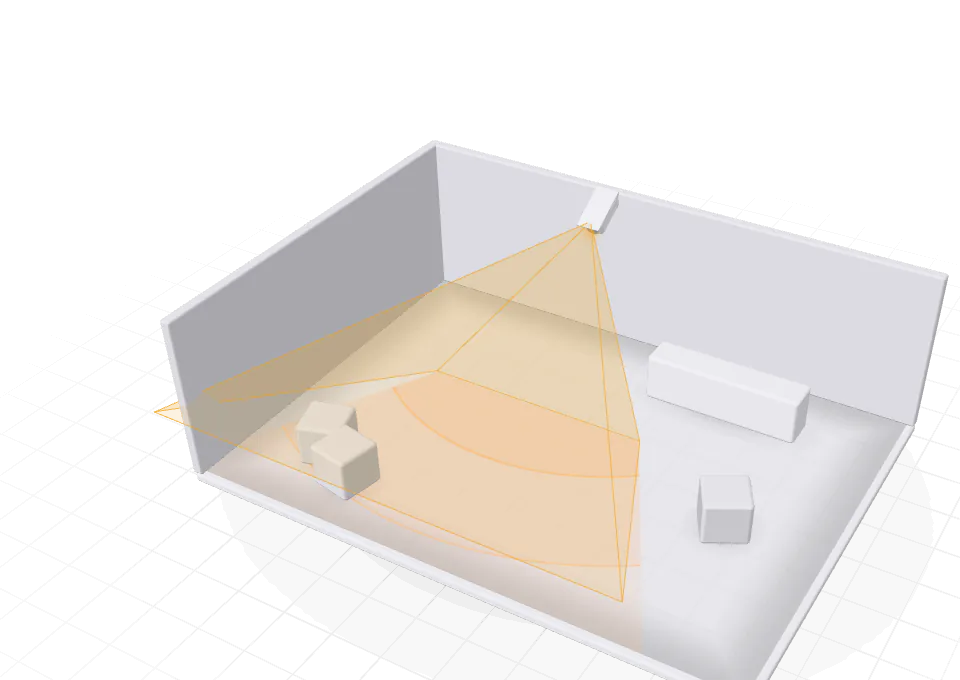
A camera that sees the till is not the same as one that can identify a face at it. Draw a zone over the till and the door, set the grade each must reach, and the tool marks any gap in red. The lens calculator says whether a lens will identify a face at the distance you need.

Storage for the retention you need

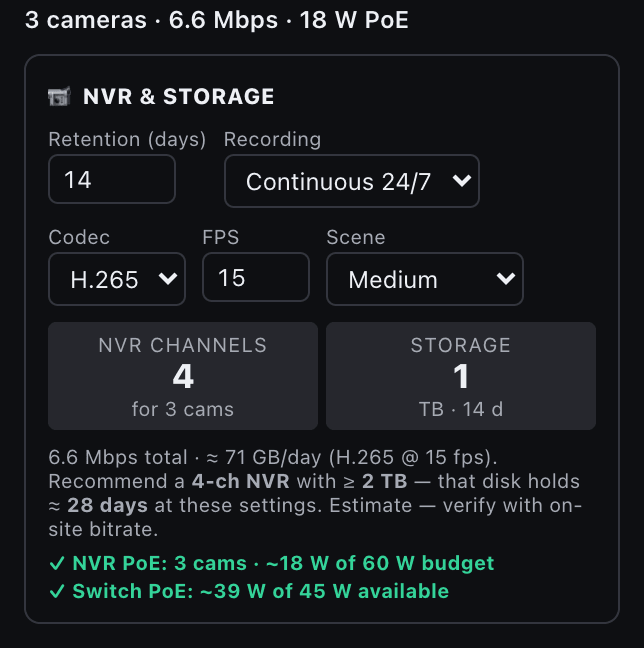
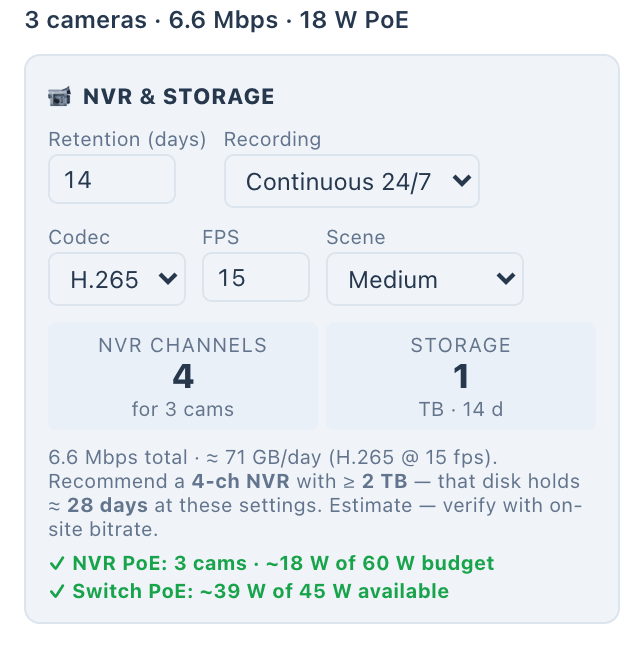
Set the retention in days, continuous or motion recording, the codec and the frame rate, and the recorder card sizes the NVR and the disks. It checks the PoE budget too: a recorder with eight channels and a switch with four powered ports is a common mistake.

The CCTV recorder card in the dark theme: 3 cameras at 6.6 Mbps and 18 W of PoE, 14 days of continuous H.265 at 15 fps, a 4-channel NVR and 1 TB of storage at about 71 GB a day, with a 2 TB disk recommended, and the PoE audit: the cameras draw about 18 W of the NVR’s 60 W budget, and the switch about 39 W of the 45 W it supplies.
The CCTV recorder card: 3 cameras at 6.6 Mbps and 18 W of PoE, 14 days of continuous H.265 at 15 fps, a 4-channel NVR and 1 TB of storage at about 71 GB a day, with a 2 TB disk recommended, and the PoE audit: the cameras draw about 18 W of the NVR’s 60 W budget, and the switch about 39 W of the 45 W it supplies.
The recorder card on the Harbour House demo: 14 days of continuous H.265 at 15 fps on a 4-channel NVR, with the PoE audit.

venue presets, 14

The rooms you add start from fourteen presets.

Pick a venue preset when you add an area, and it fills in the target, RT60, noise floor and spacing, then places the recommended speaker and any subwoofer. Every value stays editable.

The 14 venue presets by suggested level
  • Background noise the preset assumes, dBA
  • Suggested target, dB SPL
  • The template’s own targets
  • The preset for retail in full colour
  • Meeting room76 dBover 42 dBA
  • Bedroom78 dBover 30 dBA
  • Dining room80 dBover 40 dBA
  • Bathroom80 dBover 40 dBA
  • Living room82 dBover 35 dBA
  • Play room84 dBover 45 dBA
  • Kitchen84 dBover 50 dBA
  • Coffee shop85 dBover 62 dBA
  • Garden88 dBover 55 dBA
  • Outdoor patio88 dBover 60 dBA
  • Restaurant88 dBover 68 dBA
  • Sports bar92 dBover 74 dBA
  • Gym / fitness98 dBover 78 dBA
  • Small club102 dBover 80 dBA
Venue presets for retail stores, as the tool defines them
Venue presetTargetRT60NoiseSpacingRecommended speakerSubwoofer
Coffee shop85 dB0.6 s62 dBAEvenNice SC1-IC6in ceiling, surfaceNone
  • Coffee shop85 dB

    RT60
    0.6 s
    Noise
    62 dBA
    Spacing
    Even
    Subwoofer
    None
    Recommended speaker
    Nice SC1-IC6, in ceiling or surface

None of the fourteen presets is a shop. Areas you add can start as Custom, with the Background music quick pick of 85 dB, or from the Coffee shop preset for a café inside the store.

disciplines

What the template places, and what you add.

  • AudioIn the template

    Even background music on the sales floor and in the stock room.

  • Wi-FiIn the template

    Two access points, one in each area, with a signal map per band.

  • CCTVIn the template

    Two cameras to start, for the door and the till once you move them.

  • VideoAdd when the job needs it

    Screens per area; auto-design picks an HDBaseT matrix or AV over IP.

  • ControlAdd when the job needs it

    An ELAN controller sized for the touch panels and devices on the job.

Illustrative preview built for this page. The tool computes the real figures.

what you hand over, 06

From the same project, for the client and the installer.

Prepare reports opens each report with an introduction for the venue type. For retail stores, pick Commercial, retail and showroom for the audio report.

  • For the client

    • System reports

      A branded PDF for audio, video, control, Wi-Fi, CCTV, wiring or the rack, or all of them in one.

      • PDF
    • Client proposalPremium for dealers

      Your cover image, grouped by area and priced, with labour, tax, terms and a signature block.

      • PDF
    • Client handover

      A PDF, or a ZIP with the drawings and the equipment, cable and commissioning schedules.

      • PDF
      • ZIP
  • For the installer

    • Room sheets

      One page per area, with its equipment and connections, for the people pulling the cable.

      • PDF
    • Rack elevation

      Front and rear, with the PDU outlets, the power budget, heat and weight.

      • PDF
      • DXF
      • PNG
  • For the office

    • Priced bill of materials

      The BOM with the speaker installation schedule, the cable schedule and a pull schedule per run.

      • CSV

questions

About the retail template.

Is there a preset for a shop floor?

No. The fourteen venue presets cover homes, hospitality, meeting rooms, gyms and outdoor areas. For a shop, start from the retail template, or add areas as Custom with your own target.

Does the CCTV design size the recorder?

Yes. From the retention, the recording mode, the codec and the frame rate, the recorder card sizes the NVR channels and the storage, and checks the PoE budget against the cameras.

Which report introduction suits a shop?

The audio report offers a Commercial introduction for retail and showrooms. Pick it in Prepare reports before you generate the preview.

Open Retail demo, then make it yours.

Approved companies get a 15-day trial of the full workspace, templates included.

15-day trial for approved companies. No card, nothing to cancel.

Search the site